Everything RedminePRO adds on top of Redmine.

The Redmine core is the foundation. The features below are the product, built and maintained by one team and shipped with every upgrade.

RedminePRO is a complete project management system built on the open-source Redmine core and delivered as a fully managed cloud service. On top of that core it adds a suite of built-in features — Zaira AI, project templates, a visual workflow designer, a time tracker, an append-only audit trail and resource management among them — developed and maintained by a single team rather than assembled from third-party add-ons. Every plan keeps full Redmine administrator access, and every feature listed on this page ships with the platform and is upgraded with it.

Redmine is the core

Think of Redmine here the way you would think of a kernel. It is the data model — issues, projects, trackers, workflows, custom fields, roles — and it is the administration panel that lets you shape all of it. RedminePRO does not fork it, hide it, or replace it with a lookalike. That is a deliberate constraint, and it is what makes the rest of this page safe to promise.

It also decides what happens if you leave. Because the data model is stock Redmine, your files and database are yours on request, at any time, and they restore onto any standard Redmine. There is no proprietary schema to escape from. A feature suite built on a fork would not be able to say that, which is the trade most products in this category quietly make. How the managed cloud works.

Plan and deliver

Shaping the work before it starts, and keeping its shape as it moves.

Agile Boards

Scrum and Kanban boards over the same issues everything else uses. Drag a card and the issue's status changes; change the status in the issue and the card moves. There is no separate agile database to reconcile, which is the failure mode teams hit when the board is a bolted-on tool with its own copy of the work. Columns follow the workflow you designed rather than a fixed set someone else picked.

Available on Plus and above.

Gantt and Portfolio

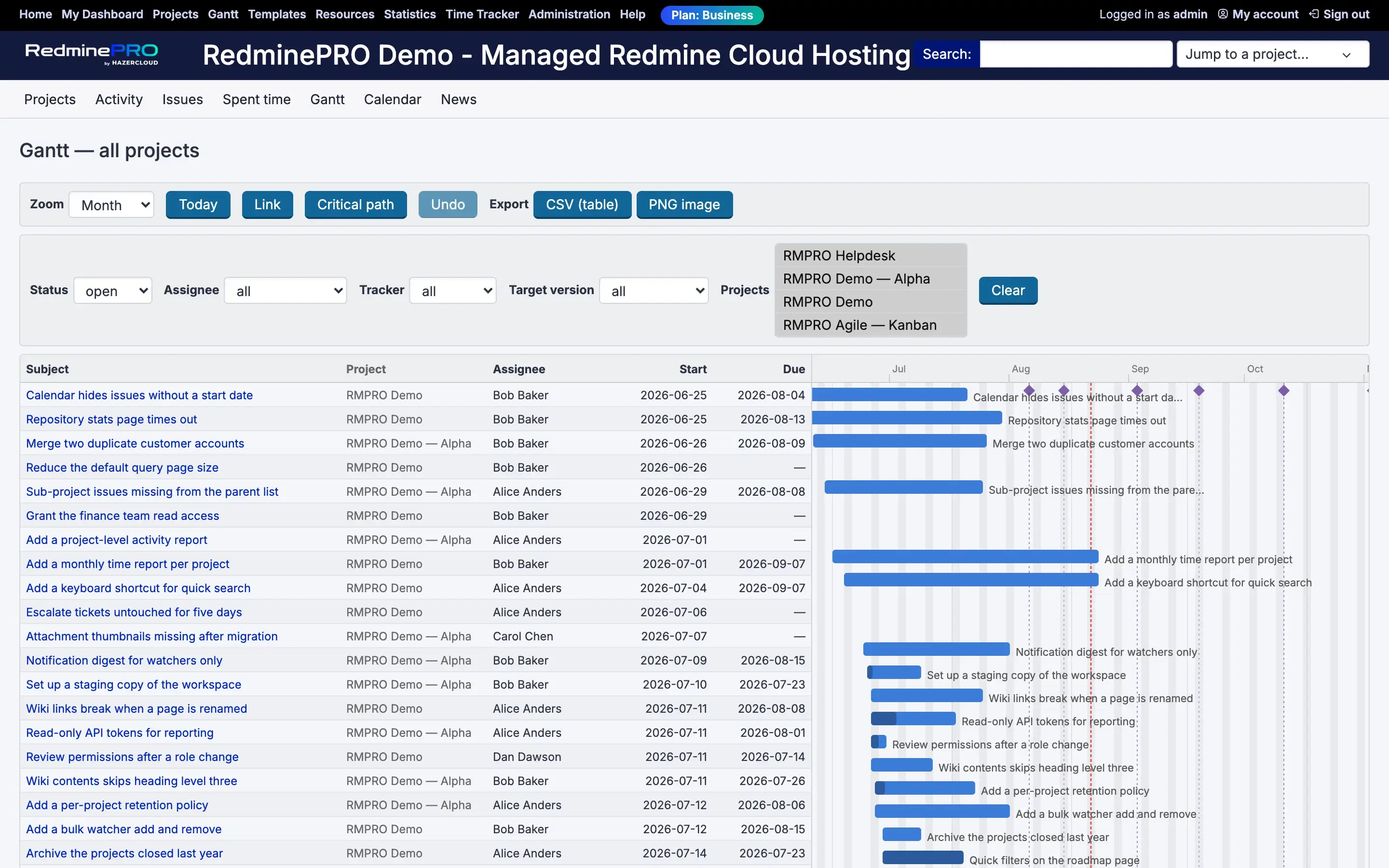
An editable Gantt: drag a bar to move dates and the issue updates, rather than a read-only picture that is stale the moment it renders. Dependencies and milestones come from the issue relations already in Redmine. The portfolio view lifts the same data above a single project, so a programme of related projects can be read on one timeline instead of opened one at a time.

Available on Business and above.

Project Templates

Start projects from a gallery, with structure, starter issues and members already in place. The value is not saved keystrokes; it is that the tenth project of a kind is set up the same way as the first, so reporting across them means something. Teams that run repeatable engagements — onboardings, audits, installations — stop rebuilding the same skeleton and stop quietly diverging from it.

Available on Business and above.

Workflow Designer

Your status flow as a visual, editable chart rather than the grid of checkboxes stock Redmine gives you. You can see which transitions exist, which roles may make them, and where a status has become a dead end. Because it edits the real Redmine workflow, nothing is simulated: what the chart shows is what the tracker enforces. Editing a flow visually also makes it obvious when a status has quietly accumulated transitions nobody intended.

Available on Business and above.

Work faster

The small frictions that decide whether a tracker is used honestly or worked around.

Quick Edit

Click any issue field and change it in place. No edit mode, no full-page reload, no scrolling to a form at the bottom. It sounds minor until you count how often a triage pass touches twenty issues to change one field on each. Fields that are cheap to correct get corrected, which is the difference between a tracker that reflects reality and one nobody trusts.

Available on every plan.

Checklists

Sub-items inside an issue, ticked off individually, without creating a child issue for every step. Definition-of-done items, release steps and review gates live on the issue itself rather than in a comment that scrolls away. Progress is visible at a glance instead of requiring somebody to read the thread and infer how far along the work actually is. They also survive handover, because the remaining steps are written down on the issue rather than held by whoever started it.

Available on every plan.

Time Tracker

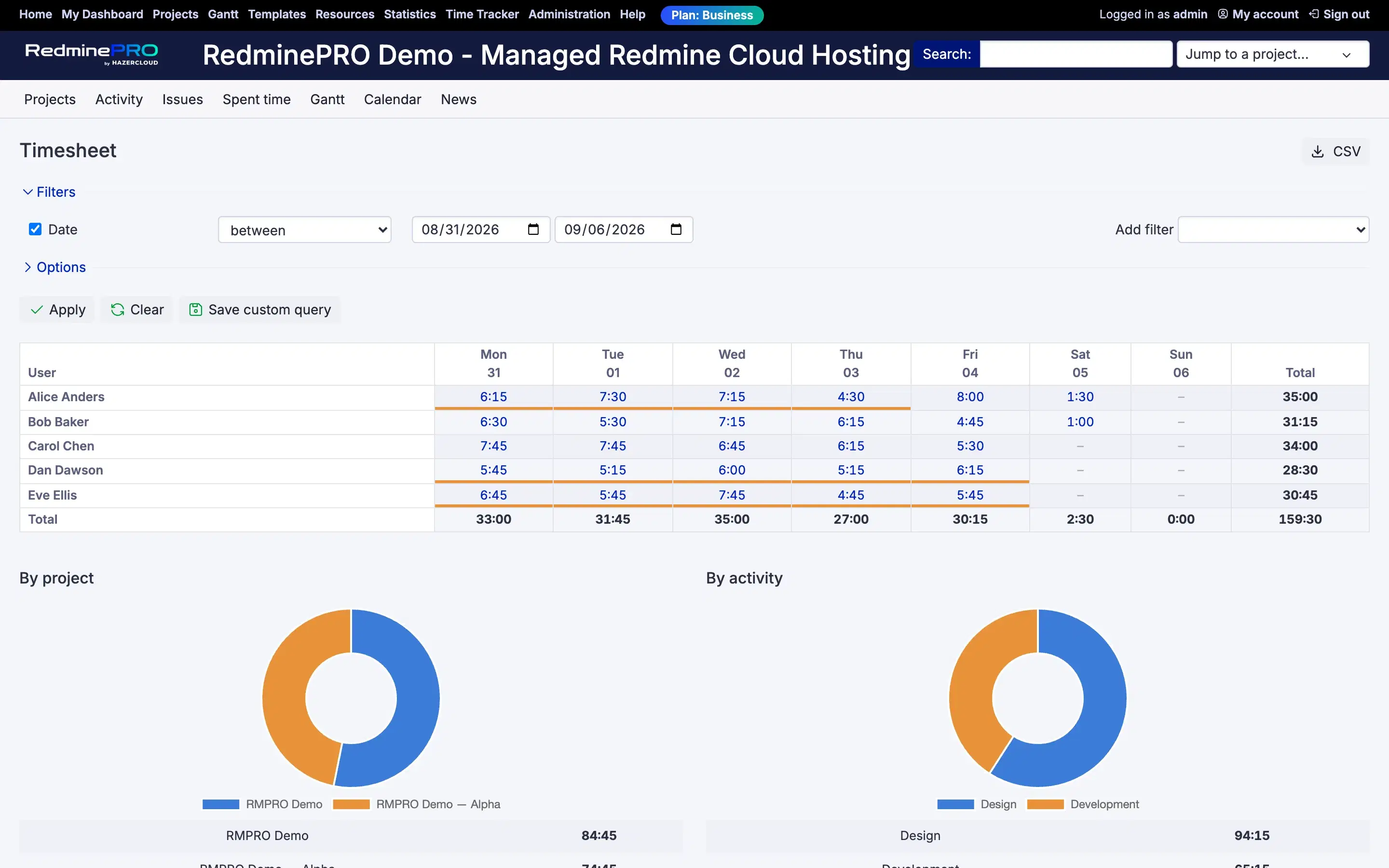
A start and stop timer in the top bar, and timesheets across people and days. Time is captured while the work happens rather than reconstructed on Friday afternoon, which is when time data stops being usable for anything. Entries attach to the issue, so effort rolls up by project without anyone maintaining a parallel spreadsheet. For teams that bill by the hour, that is the difference between an invoice defended from records and one defended from memory.

Available on Plus and above.

Attachment Preview

Open an attachment in the browser instead of downloading it to look at it. On an issue with a dozen screenshots, that is the difference between scanning the thread and filling a downloads folder with files named image-3.png. Nothing leaves the workspace to be viewed, which also means nothing has to be cleaned up afterwards. Reviewing a design or a bug report becomes reading one page rather than opening a folder alongside it.

Available on every plan.

Auto Assign

Issues route to the right person on every status change, following rules you set rather than a convention people are expected to remember. It never overrides a human: if somebody has deliberately assigned an issue, that decision stands. The point is that nothing sits unowned in a status simply because the person who moved it did not know whose turn was next.

Available on Business and above.

See everything

Reporting that answers a question without exporting anything.

My Dashboard

A personal landing page assembled from the blocks each person actually needs: their issues, watched items, recent activity, time. Redmine's own home page is the same for everybody, which means it is useful to nobody in particular. Each person arranges their own, so the first screen after sign-in answers what should I do next rather than requiring a saved query.

Available on every plan.

Daily Digest

One email each morning per person: what is overdue, what is due soon, what changed. It replaces per-event notification mail, which people either filter into a folder they never open or disable entirely — and once notifications are off, the tracker stops being the place where things get noticed. One predictable summary is read; forty individual alerts are not. It is per person, so what arrives is that person's work rather than the whole project's activity.

Available on every plan.

Statistics

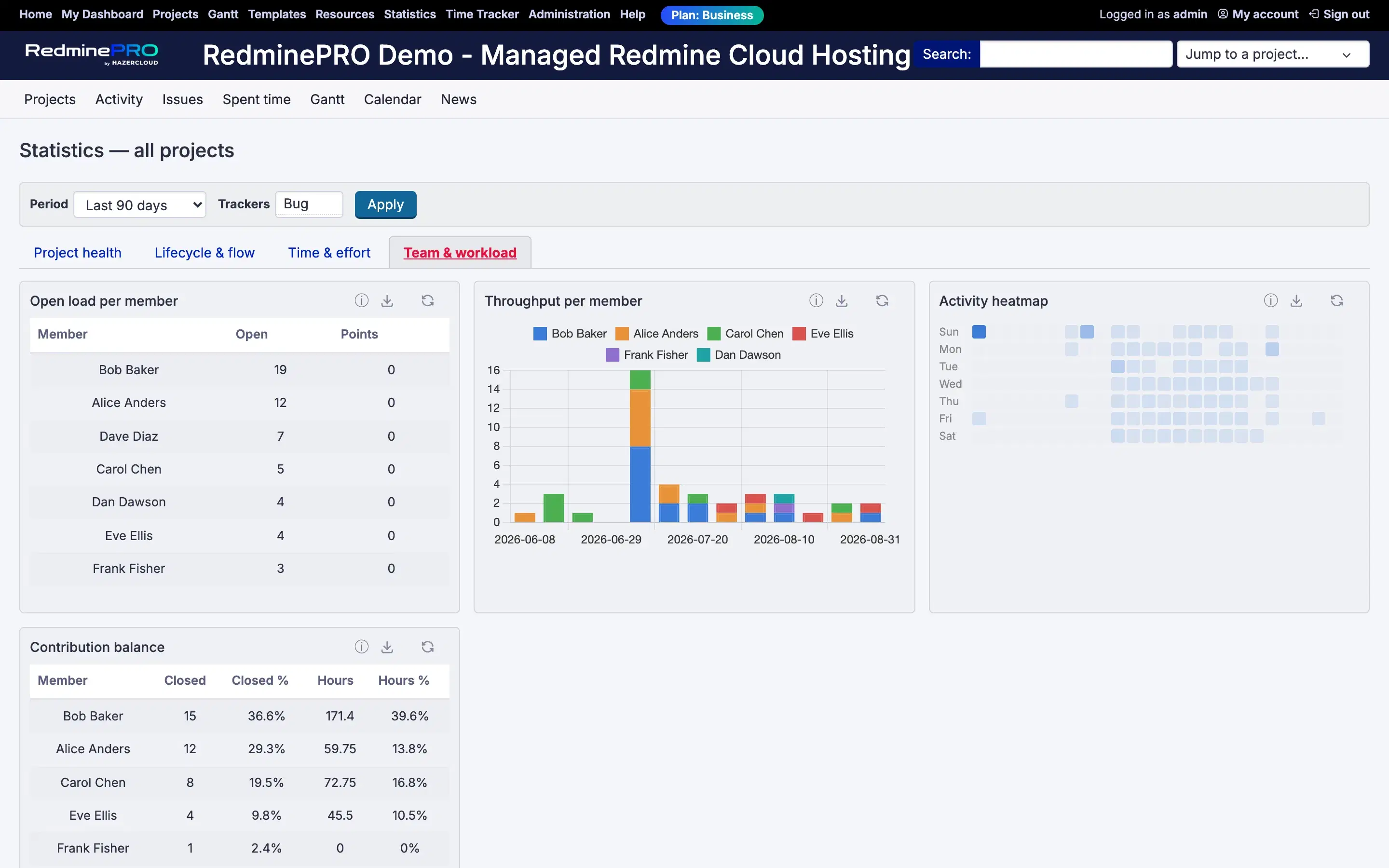
Manager-level reporting over the live data: created against closed, backlog trend, resolution time distribution, ageing work in progress, first response time, reopened rate. These are the questions a delivery review actually asks, answered from the tracker rather than from a spreadsheet someone rebuilds each month. Because it reads live issues, the number in the meeting matches the number in the system.

Available on Business and above.

Resource Management

Bookings measured against real issue load rather than an optimistic guess, with a capacity heatmap and a forward view. It answers who is already committed before more work is promised on their behalf. Because it draws on the same issues and time entries as everything else, capacity planning stops being a separate document that disagrees with the tracker within a week.

Available on Business and above.

AI

An assistant inside the tracker, not a separate window to paste into.

Zaira AI

Summarize a forty-comment issue in seconds. Draft the reply. Turn a messy description into a well-formed ticket. Ask questions across a project and get answers with citations, so an answer can be checked rather than taken on faith. Enterprise-grade by default: per-user consent, PII redaction, quotas, a full usage log, and nothing is written without human review. Supported providers include OpenAI, Anthropic, Gemini and AWS Bedrock.

Available on every plan.

Customers, code and sign-in

The edges where the tracker meets everything else.

Helpdesk

Turn inbound customer email into issues and reply from the issue, so a support conversation and the engineering work on it are the same record. Without it, support lives in a shared mailbox and development lives in the tracker, and the two are reconciled by somebody copying text between them. Here the customer thread and the ticket history are one thing.

Available on Business and above.

GitHub Integration

Commits and pull requests linked to issues, with pull-request state visible on the ticket. Anyone reading an issue can see whether code exists for it and whether that code has merged, without leaving the tracker or asking in chat. The link is made from the commit or PR itself, so it does not depend on someone remembering to paste a URL into a comment.

Available on Business and above.

Google Sign-In

OIDC single sign-on with domain allowlisting, so access follows the Google Workspace account people already have. Onboarding does not mean issuing another password, and offboarding is one action in one place rather than a checklist item that gets missed. Domain allowlisting keeps sign-in to your own organisation rather than to anyone holding a Google account. Sign-in also stops being a support request, because there is no separate credential to reset.

Available on Plus and above.

Microsoft Sign-In

Entra ID single sign-on, for organisations whose identity already lives in Microsoft. The same argument as Google Sign-In: one account, one place to revoke it. For teams under an access-review obligation, it matters that tracker access is granted and removed through the directory that is already being audited, rather than in a separate user list. Access reviews then cover the tracker automatically, instead of treating it as an exception somebody has to remember.

Available on Business and above.

Mattermost

Chat integration on every plan, including Startup: issue activity reaches the channel where the team is already talking. The point is not another notification stream but that a conversation about a problem can start from the event itself, with the issue one click away rather than described from memory by whoever noticed it first. Because it is on every plan including Startup, the smallest team gets it on day one rather than at an upgrade.

Available on every plan.

Governance

The record of what happened, and telling everyone at once.

Audit Trail

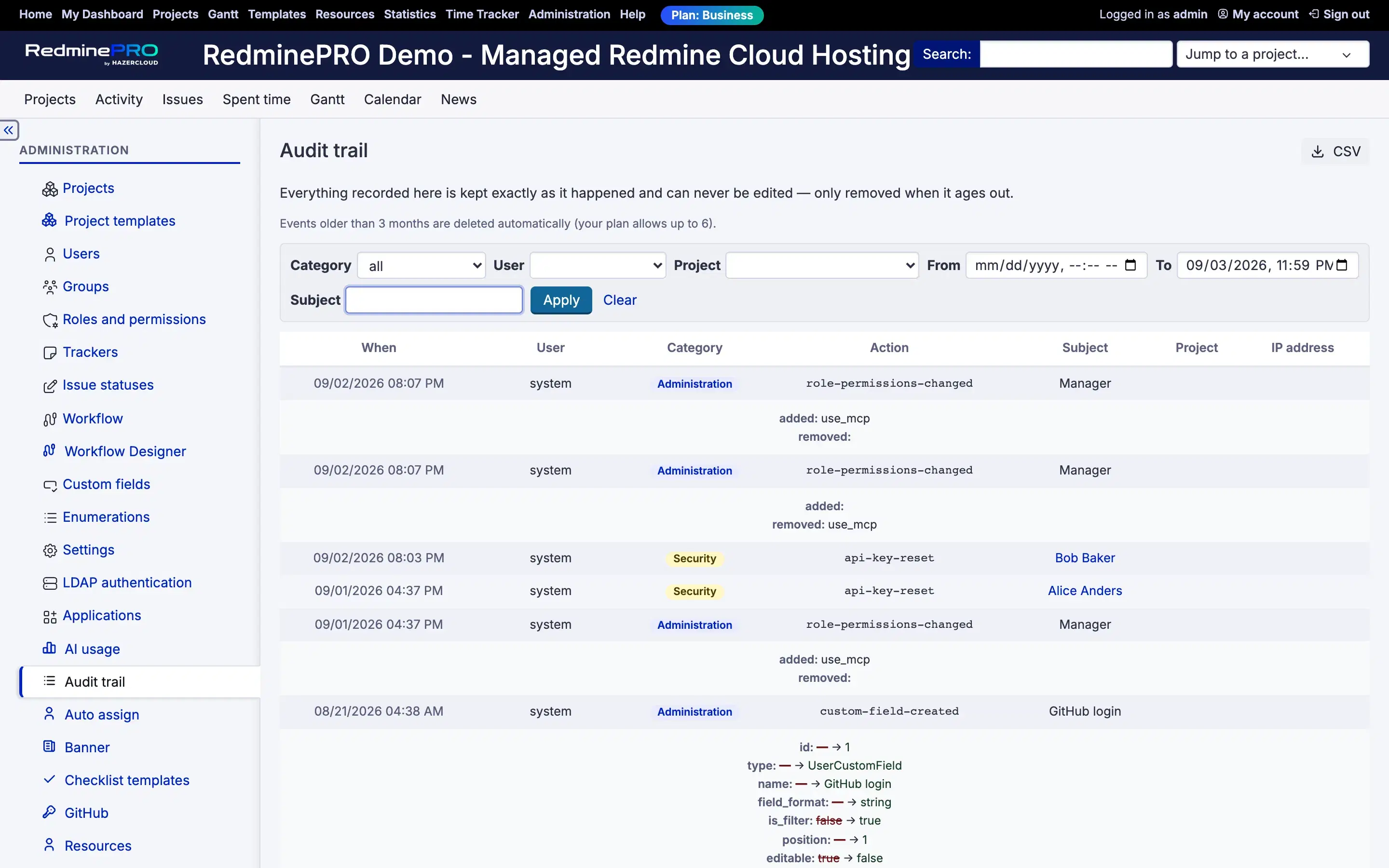
An append-only record of deletions, configuration changes and sign-ins. Stock Redmine keeps a journal of issue edits, but not of who removed a project, who changed a workflow, or who signed in from where. When somebody has to answer that question — an auditor, a customer, or your own team after a surprise — the difference is between an answer and a reconstruction.

Available on Plus and above.

Announcement Banners

Global and per-project notices, with scheduling. Maintenance windows, process changes and deadlines appear where the work is rather than in an email sent to everyone at once and read by a third of them. Scheduling matters because the useful time to publish a notice is rarely the time somebody happens to be at their desk to write it. A notice can be written when it is known and shown when it is relevant, which is rarely the same moment.

Available on Business and above.

How this compares to plain Redmine hosting

A plain Redmine host gives you Redmine and a server to run it on. Everything above this line, you assemble: you find an add-on for time tracking, another for agile boards, another for the Gantt, and then you own the compatibility matrix between all of them and whichever Redmine version you are on. The bill for that arrives at upgrade time, which is also when it is least convenient.

The difference is not that add-ons cannot do these jobs. It is who is responsible when the next Redmine release lands. Here that is one team, testing the platform and the features together before either moves. How RedminePRO compares to the alternatives, and what to ask any hosted Redmine vendor.

Availability by plan is on the pricing page, where the same list appears as a plan-by-plan comparison table.

Features, answered.

What does RedminePRO add on top of Redmine?
A suite of features built and maintained by the RedminePRO team: Zaira AI, project templates, a visual workflow designer, auto assignment, a time tracker with timesheets, an append-only audit trail, resource management, agile boards, an editable Gantt with portfolio view, dashboards, statistics, helpdesk, GitHub integration, Google and Microsoft single sign-on, chat integration, checklists, quick edit, attachment preview, daily digests and announcement banners. The Redmine core underneath stays standard and stays yours, including the full administration panel on every plan.
Is the AI assistant included?
Yes. Zaira AI is on every plan, including Startup, at no extra cost. It summarizes issues, drafts replies, turns rough descriptions into well-formed tickets and answers questions across a project with citations. It runs with per-user consent, PII redaction, quotas and a full usage log, and nothing is written without human review.
Are these third-party plugins?
No. They are built and maintained by the RedminePRO team and ship with every upgrade, which is the whole point: there is no add-on to source, no compatibility matrix to check before a version bump, and no plugin that quietly stops working after an upgrade. One team builds, tests and ships the platform and the features together.
Which features are on the Startup plan?
Startup includes Zaira AI, My Dashboard, Checklists, Daily Digest, Attachment Preview, Quick Edit and Mattermost chat integration, plus full Redmine administrator access and unlimited projects for 25 users. Time Tracker, Google Sign-In, Audit Trail and Agile Boards start on Plus. Gantt, Workflow Designer, Auto Assign, Project Templates, Statistics, Resource Management, Helpdesk, GitHub Integration, Microsoft Sign-In and Announcement Banners start on Business.
Can I bring my own plugins?
Bring Your Own Plugins (BYOP) is an Enterprise feature, and custom plugin development is reviewed case by case. On other plans the feature set is what RedminePRO ships, which is what makes upgrades safe to run on your behalf.
Do I still get the Redmine administration panel?
Yes, on every plan from Startup: trackers, statuses and workflows, custom fields, roles and permissions, per-project modules and configuration. That is the real administration panel, not a reduced settings page, and it is the thing most managed-Redmine providers keep for their own staff.


See it running.

A card is required to start your trial. Billing begins automatically on day 8 unless you cancel.