

When an issue reaches a status, it goes to the right person automatically, without anyone remembering to do it.
Issues route to the right person on every status change, following rules you set rather than a convention people are expected to remember. It never overrides a human: if somebody has deliberately assigned an issue, that decision stands.
Most teams already have the rule. Bugs that reach Testing go to the QA lead. Anything that lands in Needs review goes back to whoever wrote it. Support escalations go to the duty engineer.
The rule lives in somebody's head, or in an onboarding document, and it holds right up until the week everyone is busy. Then an issue sits in Testing for four days assigned to nobody, and the person who would have picked it up never saw it, because Redmine only tells you about work that has your name on it.
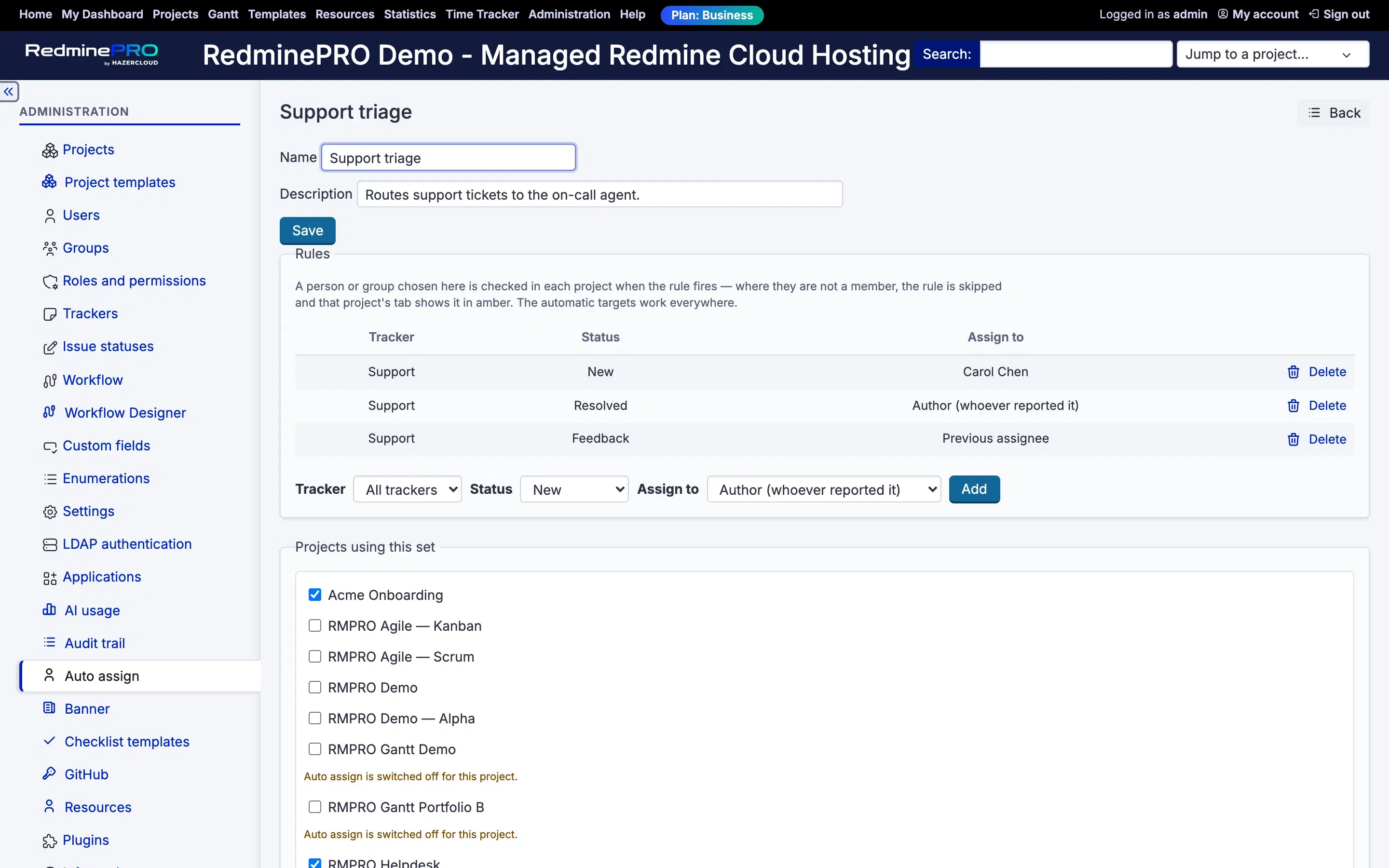
That is the whole shape of it. When an issue of this tracker reaches this status, assign it to this target. A rule can also cover all trackers in a project, for the routing that does not care what kind of issue it is.
The target can be a person, provided they can be assigned issues in that project. It can be a group, where Redmine's group assignment is switched on. And it can be one of three automatic targets that mean something in every project rather than naming anyone. The issue's author sends it back to whoever reported it. The previous assignee sends it back to whoever held it before the current holder. Nobody clears the field, which is what a triage queue actually is.
Those three are what make a rule set shareable across projects. A rule naming a person only makes sense where that person works. A rule saying back to the author makes sense everywhere.
If the same save that moved the status also set the assignee by hand, the manual choice stands. That includes clearing the field: emptying it is a decision too, and treating it as an empty slot to fill would be the same mistake in the other direction.
This is the difference between automation people keep and automation people disable. A rule that occasionally overwrites a deliberate choice costs more trust than it saves effort, because after it happens once nobody is sure whether their assignment will hold.
The same deference applies at creation. The initial status counts as changed to, so a rule for the status new issues open in does fire when an issue is created. But if Redmine's own category default has already filled the assignee, that stands, on the grounds that it is another explicit configuration and the two should not fight.
Four cases, all of them silent by design and visible after the fact. The human set the assignee in the same save. The feature is switched off for that project, which also stops inherited rules rather than only local ones. The target cannot be assigned, because they left the project, their account is locked, the target was deleted, or group assignment is off for the workspace. Or the rule says previous assignee and there is no history to go back to, since nothing to restore is not a reason to clear.
In the third case the rule is skipped, the save proceeds, and the project's rules tab shows that rule in amber with the reason. An issue never fails to save because a routing rule pointed at somebody who has left, and a rule that has quietly stopped working does not stay quiet.
Named rule sets are defined centrally and attached to projects, so the routing your organisation agrees on is written once. A project can then have its own rules, and its own always beat the ones it inherits.
Resolution runs most specific first: the project's own rule for this tracker, then the project's own rule for all trackers, then the inherited set's rule for this tracker, then the inherited set's rule for all trackers. If nothing matches, the assignee is left exactly as it was. Doing nothing is a legitimate outcome and it is the default one.
Two controls govern who changes any of this. The feature is enabled per project, and the Manage auto-assign rules permission is granted per role, so the people who configure routing are the people who own the process rather than everybody with a login.
Auto assign is on the Business and Enterprise plans. Startup and Plus do not include it. It pairs closely with the workflow designer, which is where you can see the status flow the rules hang off. Compare the plans, or see the rest of what RedminePRO adds to Redmine.
Set-up and permissions: Auto Assign in the Knowledge Base. Install it on your own Redmine.
7-day trial on any plan. Full Redmine administrator access from the first day.