

Personal dashboard giving each user visibility of their assigned work across projects.
A personal landing page assembled from the blocks each person actually needs: their issues, watched items, recent activity, time. Redmine's own home page is the same for everybody, which means it is useful to nobody in particular. Each person arranges their own, so the first screen after sign-in answers what should I do next rather than requiring a saved query.
Assigned work rarely sits in one project. A person can have issues in several, and the questions they bring to the tracker are about their own work rather than any one project's. What is on my plate? What is overdue? What is due next? Am I logging enough time? What changed on my issues while I was away?
My Dashboard answers those on a single screen. It gathers the person's assigned work from every project they can see into one view, so nobody has to build and maintain a saved query just to find out what they should be doing today. It opens from the top menu, and there is nothing to switch on per project, because a personal dashboard is not a per-project feature.
The dashboard is made of widgets, and each person decides which ones appear and where. Edit dashboard turns on arranging. You choose a grid of one, two or three columns, show the widgets you want, hide the rest, and drag them into the order that suits you. Save layout keeps the arrangement. Reset to default returns to the starting arrangement, and Done leaves editing.
Done on its own does not save. If you change a layout and leave with Done, it comes back as it was, because Save layout is what commits an arrangement.
A layout is personal and stored per user. Yours is not anybody else's. An administrator can set a default layout, which is the arrangement new people start with. It applies only to people who have not saved a layout of their own. Changing it later does not rearrange dashboards people have already saved, and that is deliberate. With no default set, the built-in default is used.
Each widget is loaded separately and cached separately. Refresh re-reads a single widget, and View all opens the full list behind it.
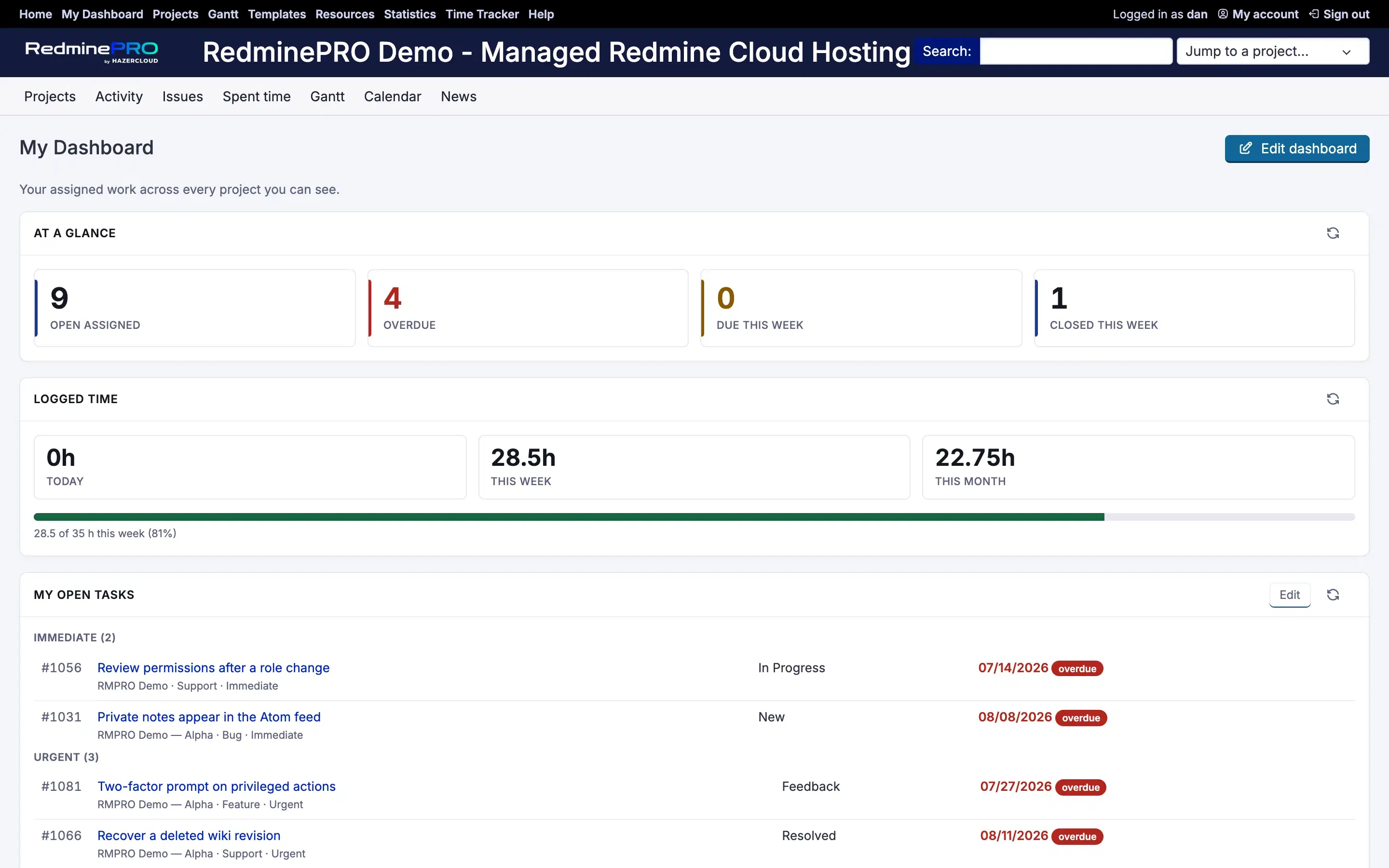
At a glance is a row of four counts: open issues assigned to you, overdue, due this week and closed this week. Each count links to a filtered issue list, so a number is always one click away from the issues behind it.
My open tasks lists your open assigned issues. It can group them by priority or by status, colours each one by its due date, filters by project, tracker and priority, and pages through a long list.
Workload by project is a bar chart of your open assigned issues in each project. Priority distribution shows the same open assigned issues by priority, as a donut. Assigned burndown is a line chart of your open issue count over the last 30 days. Completed per week is a bar chart of the issues closed each week over the last 8 weeks.
Upcoming due dates covers the next 14 days as a compact strip, with anything overdue pinned at the top. Recent activity shows the last 15 journal events on issues you are assigned to or watch, which is the answer to what changed while you were away.
Logged time shows the hours you have logged today, this week and this month. When an administrator sets a weekly target in hours, the widget adds a progress bar measuring the week against it. With no target set, there is no bar and the totals stand on their own.
Other RedminePRO features can add widgets of their own. With Reports in the workspace, a saved report widget appears alongside the others, showing the report you last ran.
By default, everyone signed in can open My Dashboard. If you would rather grant it deliberately, an administrator turns off the setting that makes it available to all signed-in users and grants a permission by role instead.
| Setting | Default | Effect |
|---|---|---|
| Available to every signed-in user | On | On means everyone signed in may use the dashboard. Off falls back to the permission below. |
| Weekly target for logged time, in hours | Blank | Gives the Logged time widget a progress bar to measure against. Blank shows the totals with no target. |
| Default layout (JSON) | Blank | The arrangement people start with until they save their own. Blank uses the built-in default. |
The permission is granted per role, in its own My Dashboard section of the role settings.
| Permission | What it grants |
|---|---|
| Use the personal dashboard | Open My Dashboard |
It only matters while the availability setting is off. While that setting is on, the permission is not consulted. When it is off, the permission is checked across the workspace rather than per project, because the dashboard itself belongs to no single project.
What a dashboard shows is never more than its owner could already open. Every issue, time entry and activity query is scoped to what the person viewing it is allowed to see, so it never shows data from a project they cannot access. That is enforced where the data is gathered, and it is covered by permission tests.
It follows that an empty widget is an honest one. It is showing what you can see, and that may genuinely be nothing: no open assignments, or nothing due in the next fortnight. Visibility is never widened to fill a widget.
Every widget is a view over data that lives elsewhere in Redmine. The dashboard's own table holds only the saved layouts. On your own Redmine, removing the plugin drops that table, and no issue, comment or time entry is touched.
My Dashboard is on every plan, from Startup. Every plan keeps full Redmine administrator access.
See what each plan includes, or look at the rest of what RedminePRO adds to Redmine.
Set-up and permissions: My Dashboard in the Knowledge Base. Install it on your own Redmine.
7-day trial on any plan. Full Redmine administrator access from the first day.