

Redmine ships a Gantt chart you can look at. This one you can use.
Drag a bar to reschedule and the issue's dates change. Drag from one bar to another and you have created a dependency. Save a baseline before a replan, and every later view shows how far the plan has drifted from it. It replaces the built-in Gantt tab and writes through Redmine's normal update path, so every change is journalled and permission-checked, and the classic view stays available if you want it.
Redmine has had a Gantt chart for years and there is nothing wrong with it as a picture. You can see the bars, the milestones and today. What you cannot do is change anything.
So the chart becomes a reporting artefact rather than a planning tool. You look at it, you notice that two tasks overlap in a way that will not work, and then you go to the issue list and edit dates one issue at a time, from memory of what you just saw. The place where the problem is visible and the place where it can be fixed are different places, and that is why Gantt charts in Redmine tend to get looked at once a month rather than used.
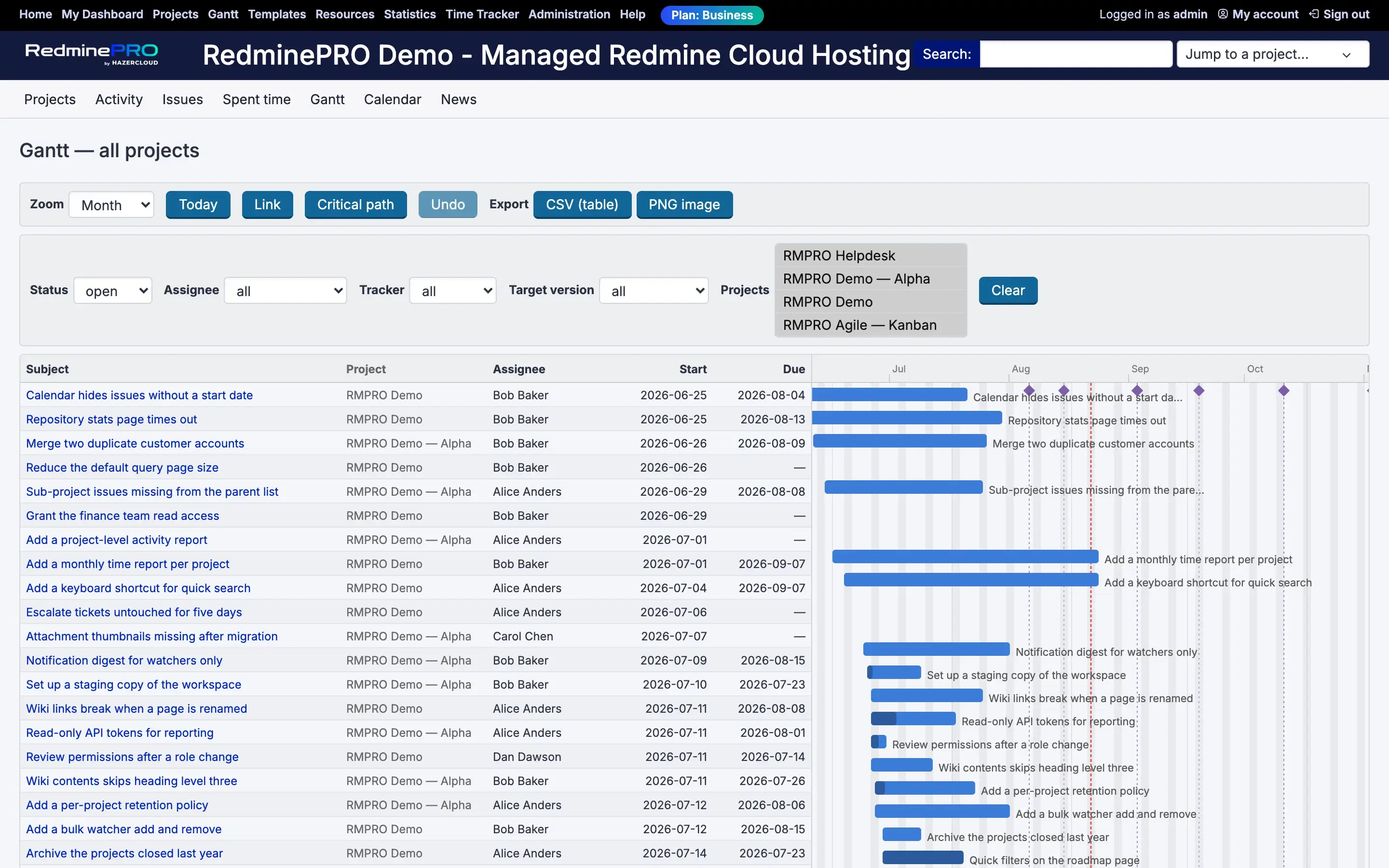
Drag a bar sideways to move a task, or take its edge to change how long it runs. Drag from one bar to another to create a dependency, with an editable delay on the link. Switch on the critical path to see which chain of work is actually setting your end date. Move a version milestone by dragging the diamond.
Colour the bars by status, priority, assignee or project. Zoom from day to quarter. Work across several projects at once in the portfolio view. Share a URL that restores the exact view you were looking at, so a conversation about a plan starts with both people seeing the same thing.
This is the part that decides whether an editable Gantt is safe to give people. Dates and progress are applied through the same model chokepoint the stock issue form uses. Workflow field permissions, journalling, notifications and the rescheduling of dependent issues all behave exactly as they do when somebody edits an issue by hand.
There is deliberately no shortcut that writes a date straight to the database. A Gantt drag must not become a way to change dates without leaving a trail, because the moment it is, the issue history stops being a complete record and nobody can tell you why a deadline moved.
Undo follows the same rule. It is a real write that sets the dates back, and it journals, notifies and can itself be refused if somebody else edited in between. One drag plus one undo leaves two journal entries. The original change was already saved and other people may already have seen it, so undo has to mean change it back rather than pretend it never happened.
The chart sends the version of the issue it drew the bar from. If that is stale, the save is refused and the current row comes back, so the client redraws rather than overwriting whoever saved first. That is the difference between a chart two people can use at the same time and one where the last person to drag wins.
A date drag applies locally straight away and rolls back if the server refuses it, because you should not have to wait on the network to see a bar move. Creating a dependency does wait, since a relation can be rejected for reasons the browser cannot know about.
Save a baseline before a replan and it becomes a fixed record of what the plan was on that day. Later views show how far the current plan has moved from it.
A baseline is immutable. Only its name can change, because a snapshot you can edit is not a snapshot. It is also visibility-scoped at the moment it is taken, so it records what the person taking it could see, rather than quietly capturing dates from projects they have no access to.
The critical path is honest about its own scope too. It covers the loaded set of issues, and the toolbar says so rather than implying it has computed something across your whole workspace. Only real precedence constrains time, durations come from the issues' own dates because Redmine schedules on working days, and a cycle reports itself instead of marking an arbitrary chain.
The Gantt entry in the project menu points here instead of at the built-in chart. Redmine's own Gantt stays reachable, linked from the bottom of the page. That link is deliberate: a replacement you cannot step out of is a harder thing to adopt than one you can.
The chart is a custom renderer with no charting library, no build step and no framework behind it, which is why it loads as part of the page rather than as a second application inside it.
The editable Gantt is on the Business and Enterprise plans. Two permissions control it per role, one to view the Gantt, the portfolio and baselines, and one to manage baselines. Drawing a dependency also needs Redmine's own permission to manage issue relations, and dragging a milestone needs its permission to manage versions.
If you are here for planning, the two features worth looking at next are project templates, which gives every project of a kind the same shape and the same dates, and agile boards for sprint work. Compare the plans, or see the rest of what RedminePRO adds to Redmine.
Set-up and permissions: Gantt in the Knowledge Base. Install it on your own Redmine.
7-day trial on any plan. Full Redmine administrator access from the first day.