

A start and stop timer per ticket that logs into Redmine's own spent time, and a timesheet over that same data.
A start and stop timer in the top bar, and timesheets across people and days. Time is captured while the work happens rather than reconstructed on Friday afternoon, which is when time data stops being usable for anything. Entries attach to the issue, so effort rolls up by project without anyone maintaining a parallel spreadsheet.
Stock Redmine has spent time and it works. What it does not have is a way to capture time at the moment the work happens. So people fill it in later, usually on a Friday, usually from memory and a calendar.
Everyone knows those numbers are approximate. The problem is that they are approximate in one direction and nobody knows which. Reconstructed time is fine for a rough sense of where a week went and useless for anything a customer sees, which makes it an odd thing to spend an hour a week producing.
Open a ticket and press Start timer in the action row, next to Log time. A chip appears in the top bar showing the ticket and the elapsed time, counting up. It follows you across pages and it survives closing the browser, because the timer lives on the server rather than in the tab.
Start a timer on another ticket and the first one stops automatically and becomes a pending draft. Nothing is logged and nothing is lost, and the chip carries a badge showing how many drafts are waiting. Switching tasks is the normal case rather than an error, so it does not need a decision.
Press Stop and a small box opens with the hours pre-filled and rounded, the activity defaulted and room for a comment. Saving creates an ordinary Redmine time entry. Cancelling that box leaves the timer running: stopping is always explicit, so closing the box, losing your connection or navigating away never discards the span you just measured.
Started one by accident? Discard deletes it outright, with no time entry and no draft. It asks once and names what it would destroy, and the discard is recorded in the server log, so where did my timer go has an answer.
Time rounds half-up to your configured granularity, fifteen minutes by default, and only once a span reaches a full bucket. Below that it logs the time it actually took. Two minutes logs two minutes. Seven logs seven. Twenty logs fifteen, and twenty-three logs thirty.
Rounding up to a full bucket was the other option and is deliberately not what happens. It would turn a thirty-second mis-click into a quarter of an hour, and these numbers end up on invoices. Under-reporting by a few minutes is recoverable. Over-reporting is a conversation with a customer.
There is no cliff at the boundary either. A second under one bucket and exactly one bucket log the same thing, so nobody loses time by working a moment longer.
Time Tracker in the top menu is where everyone lands, and nobody is refused. Without the team permission you see your own logged time, your drill-downs, your rollups and your CSV. Your own time is always yours to see, even in a workspace that never granted Redmine's own permission to view time entries.
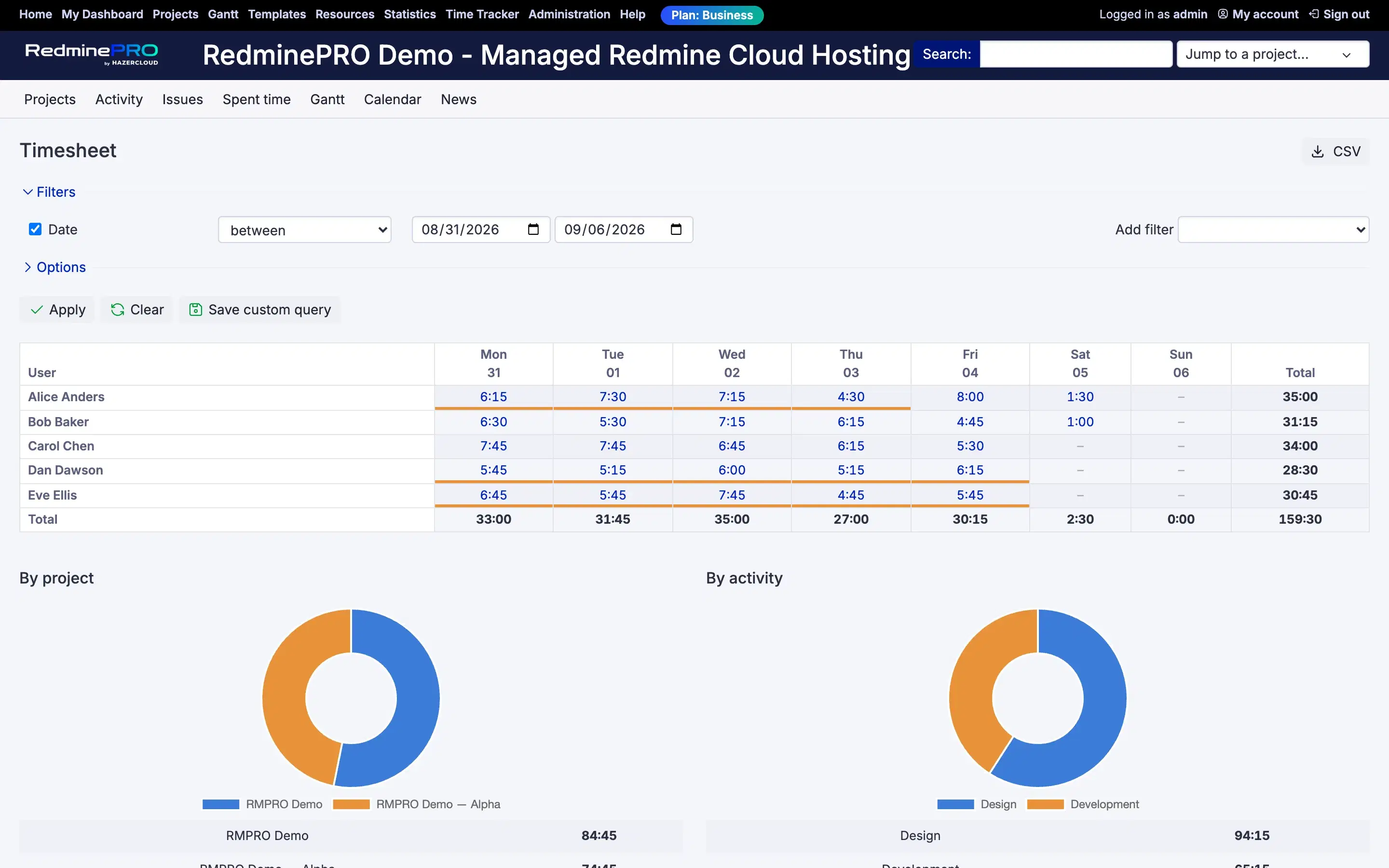
With View team timesheet you get the grid: people against days, for a week or a month, built from core time entries, so everything logged in Redmine appears however it was created. Click a cell for that person's entries on that day. Below the grid sit per-project and per-activity rollups with charts, and the whole grid exports to CSV.
Filtering uses Redmine's own filter panel, the same add-filter dropdown, operators and value widgets as the issue and spent-time pages, including custom fields on time entries. There is deliberately no second set of controls, because two controls for one choice is a question about which one wins. Filters ask and never widen: without the team permission the audience restriction applies underneath every filter, so a crafted URL asking for someone else's time matches nothing rather than returning it.
Saved filters work like saved issue queries, with Redmine's own visibility rules. Short days are flagged with a subtle marker, and when resource management is in use the expected hours come from each person's own contracted capacity, with leave days and holidays exempt.
A running timer is one database row holding the user, the issue and a start time. Elapsed time is always now minus that start, so there is no elapsed column, nothing has to tick, and a row can never go stale. The chip counts up in your browser from the start time the page was rendered with.
There are no background jobs, no scheduler, no websockets and no polling. A forgotten timer is closed lazily, by the first page load that notices it has run past the maximum, rather than by something sweeping in the background looking for them. That matters on a hosted platform, because a feature that polls is a feature you pay for while nobody is using it.
The timer has no permission of its own. It appears exactly where Redmine already allows logging time, which means the project has the Time tracking module enabled and you hold Log spent time there. Inventing a parallel switch would let a workspace end up with someone who may start a timer but may not log the time it produces.
Seeing other people's time is the single View team timesheet permission, granted per role. It is a global capability, so holding it in any role in any project gives you the team view everywhere rather than only in that project. That is worth knowing before you grant it.
Time tracking is on the Plus, Business and Enterprise plans. Startup does not include it. There are three API endpoints for scripts, using Redmine's standard authentication including API keys. Compare the plans, or see the rest of what RedminePRO adds to Redmine.
Set-up and permissions: Time Tracker in the Knowledge Base. Install it on your own Redmine.
7-day trial on any plan. Full Redmine administrator access from the first day.