

Scrum and Kanban where the cards are your Redmine issues, not a copy of them.
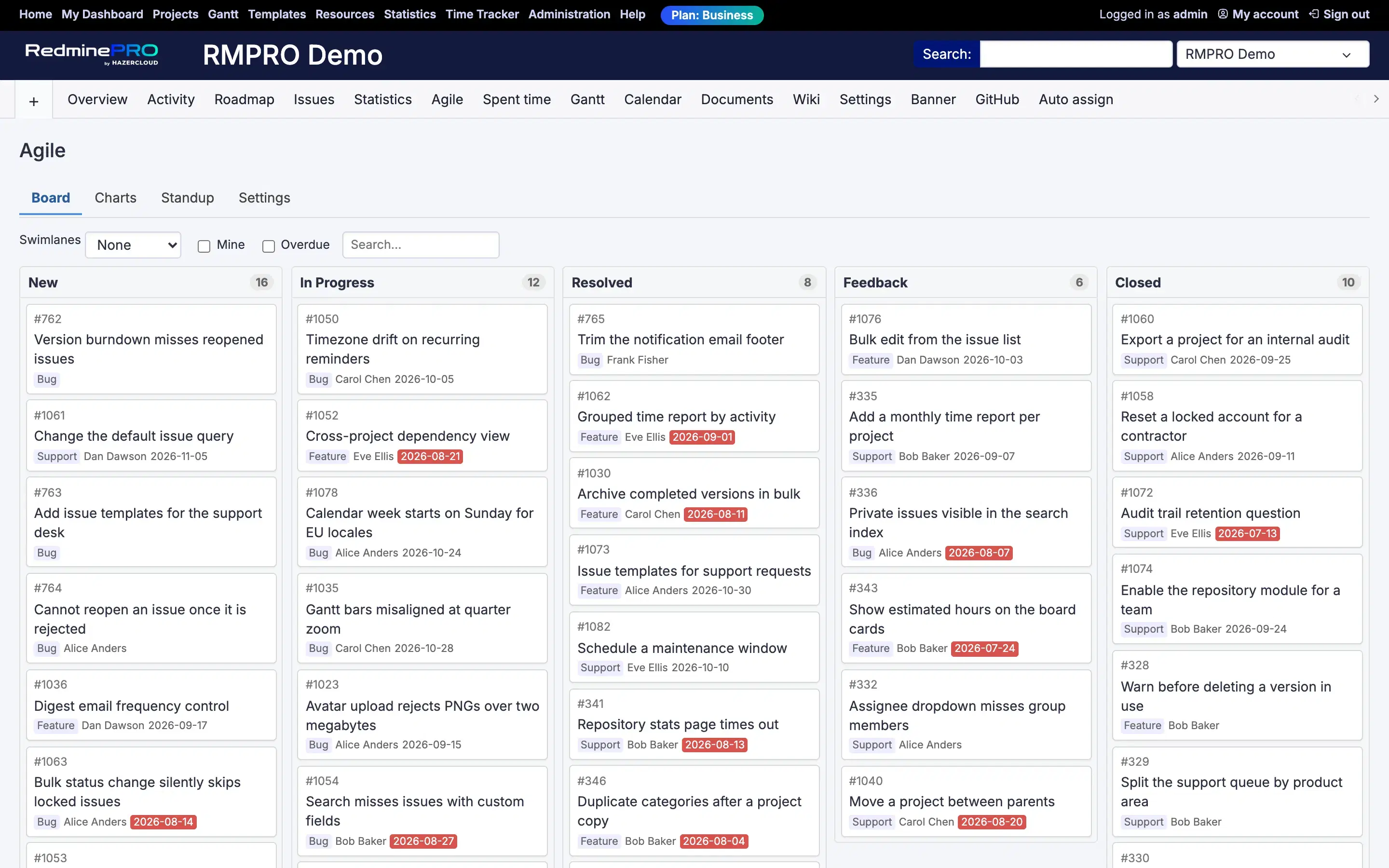
Scrum and Kanban boards where the cards are your Redmine issues, not a copy of them. Drag a card between columns and it performs a real status transition, so your workflow rules still decide what is allowed and who may do it. Sprints are their own thing rather than borrowed release versions, so a sprint and a release stay separate. Story points, a ranked backlog, burndown, velocity, cumulative flow and a standup view come with it.
The columns are your own statuses, in the order you choose. Dragging a card is not a board-only gesture that later syncs somewhere: it is a status transition, checked on the server against your workflow. A transition the role may not make bounces, and the card goes back where it came from.
That is what makes a board safe to give a whole team. The rules you configured in Redmine are still the rules. There is no second definition of the process that can drift from the first one, and no state a card can reach on the board that an issue could not reach anywhere else.
This is a small technical decision with a real consequence. A sprint here has its own records: a name, a goal, dates, and a snapshot of what was committed when it started. One sprint is active per project at a time.
Because sprints are their own model, Redmine versions stay free for what they are for, which is releases. A team can run fortnightly sprints and ship a version every quarter without the two ideas fighting over one field. If you have ever had to choose between tracking a sprint and tracking a release, that is the choice this removes.
Closing a sprint writes a second snapshot: what was completed, and what was not. Unfinished issues roll over to the product backlog or to the next planned sprint, which is the decision that actually needs making at the end of a sprint.
The backlog is two panes: a ranked product backlog on one side, the planned or active sprint on the other, each with a count and a points total in its header so capacity is visible while you plan rather than after. Drag issues between them, set points with a Fibonacci picker, and add new issues without leaving the page.
Ranking is manual and it is yours. Story points are held by the feature rather than borrowed from an existing Redmine field, so nothing you already use for something else gets quietly repurposed.
Kanban mode shows all open issues in continuous flow. Each column can carry a WIP limit, and the header shows count against limit, turning amber at the limit and red over it.
The limit can be soft, which warns and allows the drop, or hard, where an over-limit drop is refused by the server. Both are legitimate. A soft limit is a conversation starter and a hard limit is a policy, and teams that mean the second one are usually tired of the first.
Swimlanes group by assignee, priority or parent. Quick filters cover mine, overdue and a text search. The whole view state lives in the URL, so a board is a link you can send, and your swimlane choice is remembered for you between visits.
Burndown shows remaining points, or issue count, per day for a sprint against the ideal line. It is computed per sprint from the issues' own closure dates rather than from project-level daily snapshots, because a project-level snapshot cannot attribute a completion to one sprint. That makes it exact rather than approximately right.
Velocity compares committed against completed across the last ten closed sprints, taken from the sprint snapshots. Cumulative flow is a stacked per-status area over a two, four or eight week window. For Kanban there is current WIP with average days in column, derived from status-change history. Every chart exports to CSV.
There is a fullscreen standup mode with keyboard navigation, for the ten minutes each morning when the board is the only thing on the screen.
The board refreshes itself every thirty seconds and pauses while you are dragging. Concurrent edits reconcile on the next refresh, and a card someone else changed underneath you comes back refreshed rather than overwriting their work.
Agile boards are on the Plus, Business and Enterprise plans. Two permissions govern them per role: one to see the board, backlog, charts and standup, and one for board settings and the sprint lifecycle. Moving a card additionally needs the permission to edit issues and a permitted workflow transition.
If you are weighing this against Jira specifically, that comparison has its own page: RedminePRO compared with Jira. For longer-range planning alongside sprints, see the editable Gantt. Compare the plans, or see the rest of what RedminePRO adds to Redmine.
Set-up and permissions: Agile in the Knowledge Base. Install it on your own Redmine.
7-day trial on any plan. Full Redmine administrator access from the first day.