

Manager-facing analytics: a per-project Statistics tab and a global cross-project statistics page.
Manager-level reporting over the live data: created against closed, backlog trend, resolution time distribution, ageing work in progress, first response time, reopened rate. These are the questions a delivery review actually asks, answered from the tracker rather than from a spreadsheet someone rebuilds each month. Because it reads live issues, the number in the meeting matches the number in the system.
A list of issues tells you what is open. A delivery review asks something else. Are we closing as fast as we open, where is effort actually going, who is carrying what, and which projects are drifting. None of that is visible by scrolling a list, however well it is filtered.
Statistics is the manager's and founder's view across work and people. The dashboard covers your own work, and the Agile charts cover sprint mechanics. Statistics sits above both, with four groups of charts computed by one aggregation engine: issue lifecycle and flow, time and effort, team and workload, and a project health scorecard.
It reads the issues, journals and time entries Redmine already holds and never writes to them. There is no second copy of the data to fall out of step with the tracker.
Statistics appears in two places. Each project where the module is on gets a Statistics entry in its project menu. A cross-project page, reached from the top menu, covers every project where you hold the View statistics permission, and an administrator can narrow that page further to a chosen set of projects.
Every chart shares one filter bar. The period can be the last 30 days, the last 90 days, the last 6 months, the last 12 months, or a custom range with a start and an end date. Trackers are a multi-select, and a member can be chosen. All weeks start on Monday.
The active tab, the period and the filters are written into the URL, so a view can be copied and sent to someone, and the back and forward buttons behave. The period you choose is remembered for you the next time you open the page.
Each chart card carries three things. The exact formula behind the number, so a disputed figure can be checked against its definition rather than taken on trust. A CSV export of the series already loaded on the page. And a Refresh button that recomputes that card instead of reusing the cached figure.
Created vs closed counts, for each week, the issues created and the issues closed, and the net between them. It is the quickest read on whether the backlog is growing. Backlog trend shows the open count at the end of each week, rebuilt from issue history: one added when an issue is created, one taken away when it moves from open to closed, and one added back if it is reopened. That rebuild assumes issues are created open and reaches back at most 12 months.
Resolution time distribution takes the issues closed in the period and measures the days from creation to close, in fractional calendar days. It sorts them into buckets from under a day to more than 90 days, and reports the median and the 85th percentile. Aging WIP looks at every issue open now, sorts it by age into four buckets up to more than 90 days, and splits each bucket by priority.
First response time measures the hours from an issue's creation to the first journal written by someone other than its author. It is charted as a weekly median, with issues grouped by the week they were created, plus an overall median. Reopened rate gives, for each week, the share of issues closed that week which had been reopened at any point in their history.
Time and effort starts with logged hours per week, stacked by activity by default or by the issue's tracker. Hours by member shows the top 10 people in the period, with everyone else rolled into Other. Estimate accuracy takes the issues closed in the period that had an estimate above zero. It sets total estimated hours against total spent, sorts each issue's spent to estimated ratio into buckets from under half to more than double, and charts the ratio week by week. Effort is also grouped by tracker and by category, with time logged against a project rather than an issue kept apart.
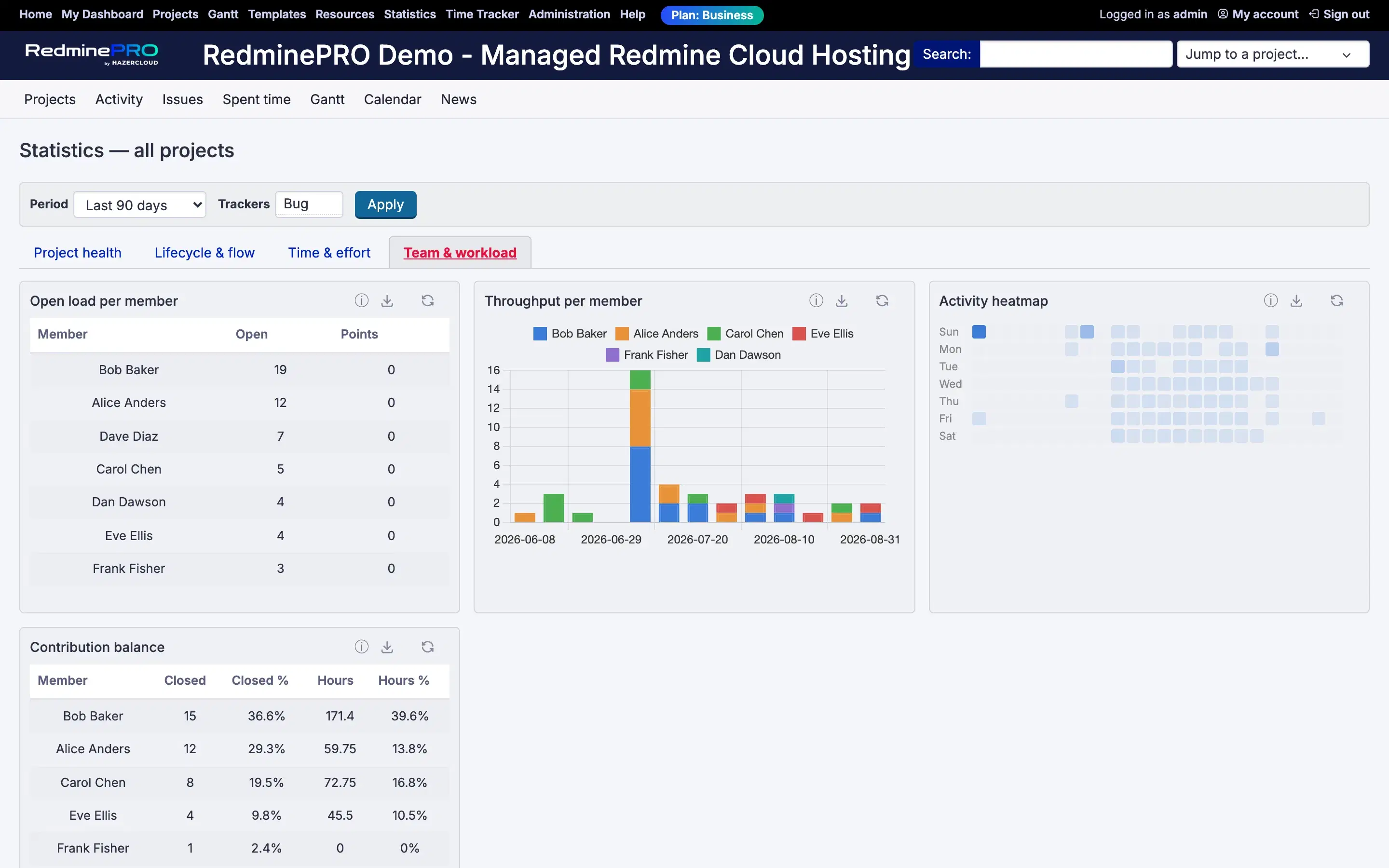
Team and workload asks who is carrying what. Open load per member counts the open issues assigned to each person now, with a story point sum beside it where the Agile feature is present. Throughput per member counts issues closed each week, credited to the person assigned now rather than the person assigned when it closed. The activity heatmap counts journals and time entries by weekday and hour, for the team or for one member. Contribution balance shows each member's share of the issues closed and the hours logged, as a percentage of the team total.
The project health scorecard gives one row per project over the period. It shows the open count now, the overdue percentage of open issues past their due date, the average days to resolve, the change in backlog since the period began, hours logged, the last activity and a 30-day sparkline of the open count. A traffic light comes from the overdue percentage measured against two thresholds you set. The backlog change and the sparkline use the same history rebuild as Backlog trend, with the same 12-month cap.
Everything sits behind one project-scoped permission, View statistics. It is not granted by default, because per-member breakdowns are sensitive. Grant it to your manager and lead roles, then turn the Statistics module on in each project that should have it.
Every query also runs as the person viewing it. Someone holding the permission still only ever sees issues and time they could see anyway. The permission controls access to the analysis, never to the data behind it.
| Setting | Default | What it does |
|---|---|---|
| Green threshold for overdue percentage | 10 | A project's traffic light is green below this. |
| Amber threshold for overdue percentage | 25 | Amber below this, red at or above it. |
| Global page projects | All projects the viewer may see | Or only the selected projects, chosen in Selected projects. Always narrowed to projects where the viewer holds View statistics. |
| Cache TTL (seconds) | 3600 | How long an aggregated figure is reused before it is recomputed. |
The default thresholds are strict. Set them to the numbers your organisation actually uses to judge lateness, or the scorecard may read red everywhere.
Every aggregate is cached, keyed on the chart, the projects, the period, the filters and a digest of what the viewing user can see. A cached figure therefore never crosses between users with different visibility. Lowering the cache time gives fresher numbers at the cost of more recomputation. All counting runs in the database. A chart is computed when it is first asked for, then read from the cache until the cache time runs out or someone presses Refresh on that card.
Statistics adds no columns to Redmine's core tables. Its only table holds per-user preferences, such as the period you last chose. Removing it drops that table. Every chart was a view over issues and time entries that live elsewhere, and those stay exactly where they are.
On your own Redmine the same feature runs as a plugin and behaves identically, with no plan gate and nothing capped by tier.
Statistics is on the Business and Enterprise plans. Startup and Plus do not include it. Every RedminePRO plan keeps full Redmine administrator access.
To start, tick Statistics in a project's modules and grant View statistics to your manager and lead roles. See what each plan includes, or look at the rest of what RedminePRO adds to Redmine.
Set-up and permissions: Statistics in the Knowledge Base. Install it on your own Redmine.
7-day trial on any plan. Full Redmine administrator access from the first day.