

Pick a template and get a project that is already set up, with the dates anchored to the day you choose.
Start projects from a gallery, with structure, starter issues and members already in place. The value is not saved keystrokes. It is that the tenth project of a kind is set up the same way as the first, so reporting across them means something. Teams that run repeatable engagements, onboardings, audits and installations, stop rebuilding the same structure.
Every agency, consultancy and internal platform team runs the same shape of project over and over. The tenth onboarding is the same work as the first. In stock Redmine it is also a fresh empty project, and whoever sets it up rebuilds the structure from memory or from the last one they can find.
The cost is not the twenty minutes. It is that the ten projects end up subtly different, and a report across them then compares things that were never comparable. Two of them used a Bug tracker where the others used Task. One called the milestone Go live and the rest called it Launch. Nobody notices until somebody asks a question that spans all ten.
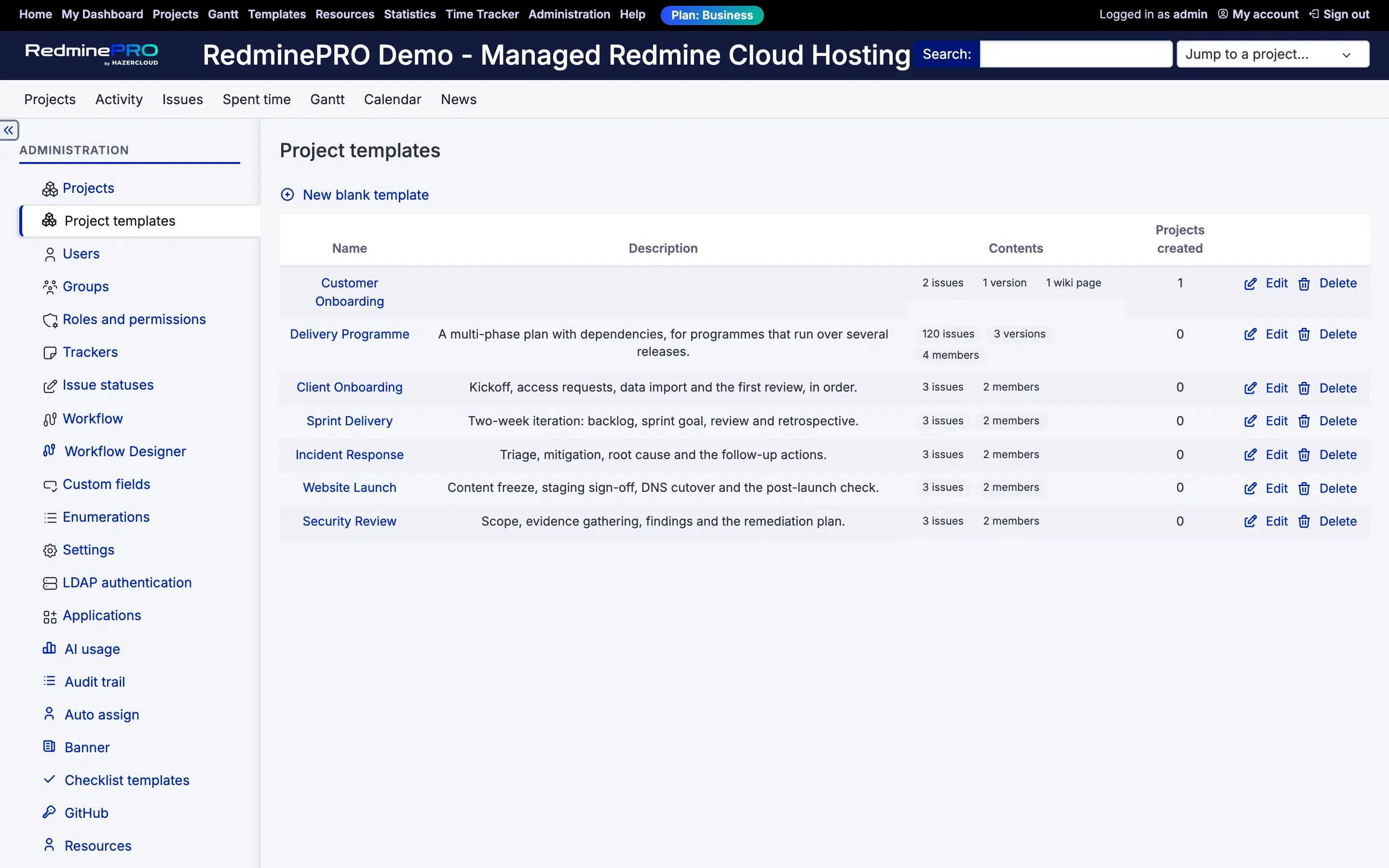
More than a project skeleton. A template holds the enabled modules, trackers, versions, issue categories, project custom field values and the public flag. It holds wiki pages with their text and their hierarchy, which means the standard operating procedure and the onboarding notes travel with the structure rather than being copied by hand afterwards.
It holds starter issues with their subject, description, tracker, status, priority, category, target version, estimate, percent done, private flag, custom fields and their subtask structure. It holds members and groups with their roles. And it holds whatever settings the other RedminePRO features contribute, so a project arrives configured rather than merely populated.
Two deliberate exclusions. Only open issues are captured, because somebody else's finished work cannot be true of a project that starts tomorrow. Attachments are not captured in this version, on issues, versions or wiki pages.
Dates are the part that usually makes copied projects useless. A template stores issue dates as whole days from the earliest date it contains, not as calendar dates.
When someone creates a project they choose a start date. The earliest issue lands exactly on it. Everything else keeps its distance, so an issue seven days after the first one is still seven days after it. Versions move with the same anchor, which keeps a milestone the same gap from the work that leads to it. An issue with no dates still has none.
Set a project up on Friday for a Monday kickoff and the dates land on Monday. A past start date is allowed too, because backdating a project that really did start last month is a legitimate thing to want.
A snapshot of a real project can only record that Alice is assigned. It cannot know whether the next project's Alice is a person or a role. Turning Alice into Project Manager is therefore a decision the template's manager makes in the editor, not something guessed at capture time.
At creation, the person starting the project is asked who fills each placeholder, and every issue and membership using it resolves to their choice. Placeholders are optional unless the template marks one required, and an unfilled optional placeholder simply leaves the issue unassigned, which is what not decided yet actually looks like.
A tracker gets deleted. Someone leaves. A role is renamed. Every one of those is skipped and said out loud: the project is created, everything that could be applied is applied, and a summary panel on the new project lists exactly what was left out and why.
Losing eleven good issues because the twelfth named a deleted tracker would be the wrong trade, so it is not the one this makes. The template editor marks stale items in amber before anyone gets that far, which puts the fix with the person who curates the template rather than the person who just created a project.
One thing is refused outright: a template written by a newer version of the feature than the one installed. Templates move between workspaces, and one that is only half understood produces a project that looks complete and is not.
Set one project up properly, then capture it. Open the project and choose Save as template from the actions menu, alongside New subproject and Settings. Re-snapshot refreshes a template from its source project later, and it is offered only while that project still exists.
After that a template stands on its own. Everything is recorded by name, so it keeps working after its source project is renamed, archived or deleted. Projects already created from a template are ordinary Redmine projects and are completely unaffected by anything that happens to it afterwards.
Two permissions control this, both set per role in Redmine administration. Create projects from templates gives a role the gallery. Manage project templates gives a role the ability to curate them, which usually belongs with your project managers rather than with everyone.
Project templates are on the Business and Enterprise plans. Startup and Plus do not include them. Compare what each plan includes, or see the rest of what RedminePRO adds to Redmine. If you run the same shape of project repeatedly, this and the workflow designer are the two features that take the effort out of the repetition.
Set-up and permissions: Project Templates in the Knowledge Base. Install it on your own Redmine.
7-day trial on any plan. Full Redmine administrator access from the first day.