

Build a report from Redmine's own filters, columns, group-by and totals, save it with a name, share it, and re-run it whenever you like.
Save a report built from Redmine's own filters and columns, re-run it any time, and export or email it as PDF, Excel or CSV. Redmine already has a good query builder on the Issues, Spent time and Projects pages. What it has no way to do is keep one as a named report you re-run on the first of the month, hand to somebody as a branded PDF, or have arrive by email every Monday. Reports reuses those three builders rather than inventing a fourth, so a relative date like this month means the month you press Run in.
Filters, columns, group-by and totals already work on three Redmine pages. The trouble starts when the same view is needed again next month, by somebody else, or in an inbox. Reports keeps the query and adds what Redmine lacks: a name, a chart, an export and a schedule. It does that without a second query engine beside the first.
A report is a saved Redmine query with a little presentation on top. Redmine keeps owning the filters, columns, sort, group-by and totals, who may open the report, and which rows each viewer sees. Reports owns the title and description, the chart, the template flag, the schedule and a record of the last run. There is no custom SQL and no join beyond what Redmine's own queries already offer.
You pick the data when you create the report: Issues, Spent time or Projects. Then you build it with the controls you already know, give it a name and, if you like, a bar or pie chart over a field you choose. The source is fixed once the report exists, because the columns of an issue query mean nothing to a time query. To change it, duplicate the report.
Opening a report evaluates its filters afresh. It shows the filter summary, how many rows you can see, the chart, and the grouped table with its subtotals and totals.
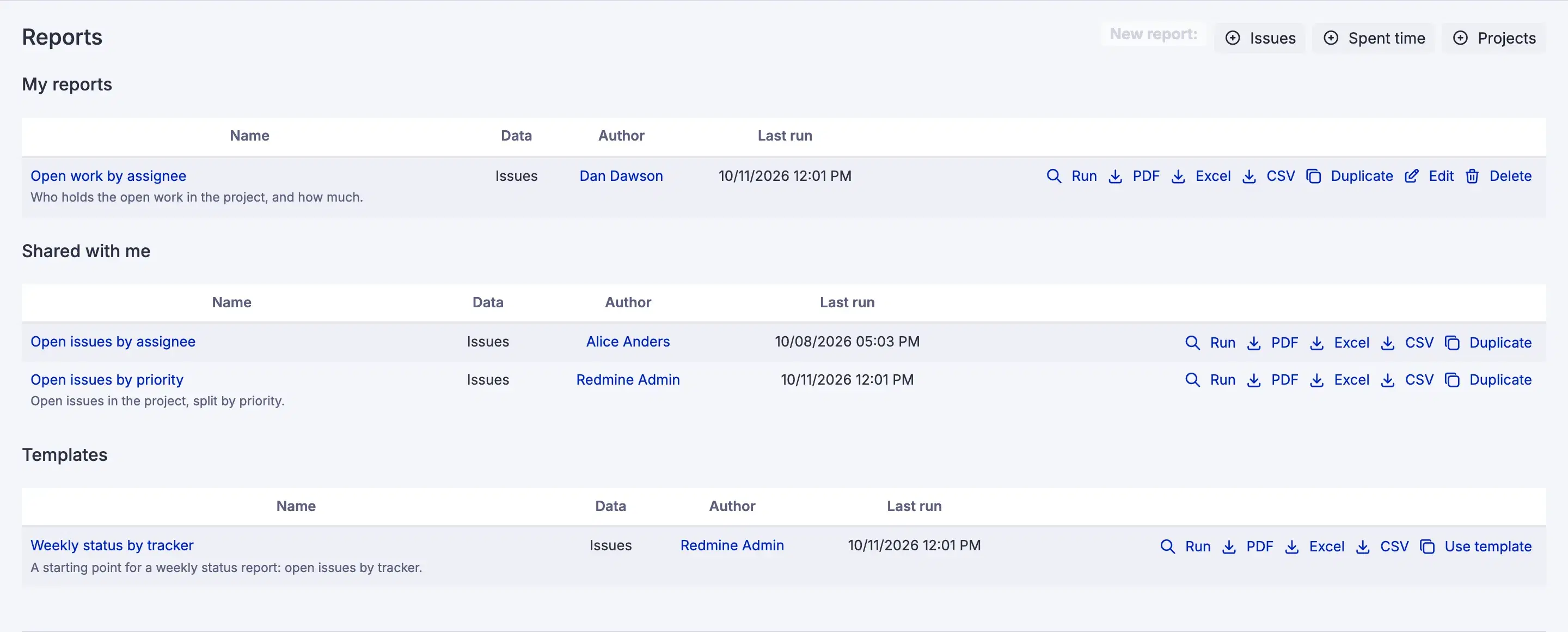
A report never widens what anybody can see. Every row comes through the visibility Redmine already applies to the reader, so a report over logged time obeys their role's time log visibility. Two people can open the same shared report and get different row counts. That is correct rather than a bug, and the page prints your count so the difference is visible instead of mysterious.
Sharing is Redmine's own query visibility: private, shared with chosen roles, or shared with everybody who may use reports. Building reports takes one permission, Use reports. Holding it in any role in any project is enough, because a report spans whatever projects its filters reach and belongs to none of them.
A report can be published as a template, and Use template gives somebody a private copy that is independent from that moment. By default only administrators may publish, because publishing puts a report in front of everyone. A private report cannot be published at all. The refusal says to share it first, and nothing is widened on your behalf.
An export has the same rows, columns and totals as the screen, scoped the same way for whoever asked for it. The PDF carries the workspace name, the report name, the filter summary, the chart, grouped tables with subtotals and totals, and page numbers, with an optional logo at the top. The Excel file is a real spreadsheet, with dates as dates and numbers as numbers, so a column of hours can be summed. The CSV is Redmine's own.
An export carries at most 5,000 rows. Past that, the honest answer is to narrow the report, said out loud, rather than a request that runs for a minute and then times out.
A saved report can carry a schedule: weekly on a weekday or monthly on a day of the month, at an hour you choose. It delivers the PDF, the Excel file or both to the people and groups you name, and it is edited with the report in one form. Scheduled delivery is off until an administrator switches it on, so adding Reports never starts sending mail to anybody.
The report is generated once, as its owner, so every recipient gets the same figures. That is exactly why the recipient list is filtered. Anybody who may not open the report is dropped and named on the report page. A schedule is not a way around visibility.
A failure is recorded and shown on the report page rather than retried, because a report that cannot be built will not build an hour later either. Times are the owner's, so Monday 08:00 means Monday 08:00 where they are. Monthly schedules stop at the 28th, because the 31st would skip February.
An administrator controls four settings:
| Setting | Default | Effect |
|---|---|---|
| Default export format | Which format the Export control offers first | |
| PDF logo | None | An image drawn at the top of every exported PDF |
| Who may publish templates | Administrators only | Or anyone who may use reports |
| Scheduled delivery | Off | The master switch for emailed reports |
Reports reads three sources and no more. It shows hours, never money. A schedule attaches the PDF and the spreadsheet, and a CSV is fetched, not posted.
If Reports is removed, its own tables are dropped and the saved queries underneath the reports go with them. Nothing else is touched. Every row a report ever showed lives in Redmine's own issues, time entries and projects.
Reports is on the Business and Enterprise plans. Startup and Plus do not include it. Every RedminePRO plan keeps full Redmine administrator access, so Redmine's own query builders on the Issues, Spent time and Projects pages are there on all four.
A workspace below Business still sees the Reports menu entry, and it opens on a page naming the plan it needs, because a menu item that is simply absent teaches an administrator nothing. See what each plan includes, or look at the rest of what RedminePRO adds to Redmine.
Set-up and permissions: Reports in the Knowledge Base. Install it on your own Redmine.
7-day trial on any plan. Full Redmine administrator access from the first day.