

Cross-project resource planning for Redmine.
Bookings measured against real issue load rather than an optimistic guess, with a capacity heatmap and a forward view. It answers who is already committed before more work is promised on their behalf. Because it draws on the same issues and time entries as everything else, capacity planning stops being a separate document that disagrees with the tracker within a week.
A resource plan has four questions to answer every week. Who is overloaded, who is free, who is on which project, and where the capacity gaps are coming. When the plan lives somewhere other than the tracker, the answers depend on which of the two was updated last.
Resource Management keeps two numbers for every person and every week. Booked is the plan. A manager books a person onto a project for a number of hours a week over a date range. Issue load is the reality. It is the open issues assigned to that person, with their estimates, spread across the working days each issue covers.
The two are never summed into one reported figure. Every cell, every lane and every CSV column keeps them apart, because merging them hides both failure modes. A person booked for 40 hours with no real issues assigned is as much a planning problem as a person carrying 60 hours of issues and no booking at all.
Availability comes first. A working day is Monday to Friday, minus holidays. A person's available hours for a week are their contracted hours, scaled down for every working day lost to a holiday or to recorded leave. A leave day that lands on a holiday is subtracted once, because that day was never a working day.
Contracted hours are effective-dated. Moving someone to part-time from a given week changes that week and the ones after it, and leaves the history as it was. Bookings ignore holidays. A public holiday does not shrink the plan. It shrinks availability, and showing both is the point.
A booking is an envelope, not an addition. If someone is booked for 40 hours on a project, the tickets on that project fill the booking rather than stacking on top of it. Only hours above the booking add to demand. Work on a project nobody booked them on counts in full. Utilization is that demand divided by available hours.
A booking is the plan for that project's work, so charging both the booking and the tickets it was made for counts the same time twice. Someone booked 40 hours on a project would cross 100% the moment anyone estimated a ticket there. The heatmap would run hot for everybody and stop meaning anything.
Worked through with 40 available hours: a 40 hour booking with 25 hours of tickets on the same project is 100%, not 162%. The same booking with 50 hours of tickets there is 125%, and the project is flagged as an overrun. The same booking with 25 hours of tickets on a different, unbooked project is 162%, because that work was never planned for. Envelopes belong to one person. Two people booked on the same project hold two separate envelopes, so one cannot absorb the other's tickets.
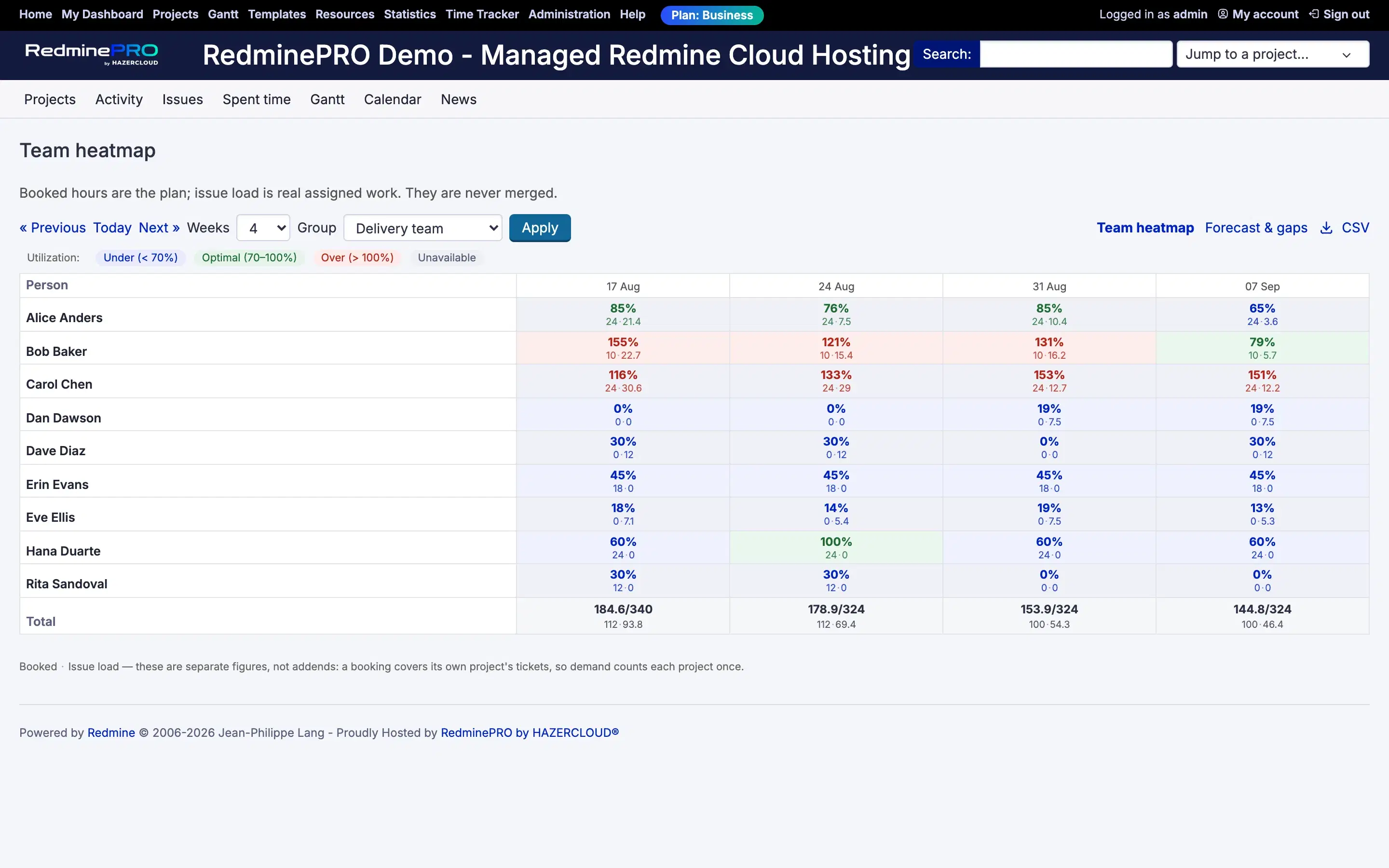
The team heatmap puts people against weeks. Each cell is coloured by how committed that person is against their capacity, using two thresholds you set: a lower band for under-utilization and an upper band for over-utilization.
The cell tooltip carries the arithmetic. Booked and issue load are shown as separate numbers, because plan and reality are different facts and a planner needs both. Demand is a third number derived from them, never their sum. Where tickets on a booked project run past the booking, the overrun is named in the tooltip. Only a booked project can overrun. Tickets on a project nobody booked are unplanned work, and calling them an overrun would put a warning on every ordinary ticket.
Guesses stay visible. An assigned open issue with no estimate counts at a configurable default, and the number of unestimated issues is reported beside it, so you can tell a plan built on estimates from one built on assumptions. An issue with no dates is never smeared across weeks. It goes to an unscheduled bucket, real work with no place on the calendar yet. A week with no available hours reads as Unavailable, never as 0%.
Around the heatmap sit the other views. Forecast and gaps looks forward to the capacity gaps that are coming. A person timeline shows one person's weeks. Project staffing shows who is on a project, and holidays set for that project apply there. The cross-project heatmap uses only workspace-wide holidays, because a person's availability cannot depend on which project you happen to be looking at.
Every view shares a window selector for the start week and the number of weeks, a group filter, a URL you can copy and send, and a CSV export.
Planning is a cross-project question, so the Manage resource planning permission behaves as a global capability. It is granted per role, and holding it in any project makes a person a planner. Planners see the team views, create and edit bookings, set capacities and record leave for anyone.
Everyone else gets their own page. Resources in the top menu takes planners to the team heatmap and everyone else to their own timeline. There a member sees the same week grid for themselves only, with booked hours, issue load, leave, availability and utilization. They see which projects they are booked on, with hours per week and start and end dates, each linking to the project. That page takes no id at all, so another person's data is not reachable through it, and the team pages are refused.
Issue load is always counted as the viewer sees it. A planner never sees work from projects they cannot access. When a person has load on such projects, those hours are left out of the numbers and the cell is marked with an asterisk that says some load is on projects you cannot see. The marker comes from a count, never from issue details. Silently understating someone's load would be worse than admitting there is a gap.
Members can record their own leave when the setting allows it. It is the same record a planner makes, so it shows in the heatmap straight away. A member can never enter leave for someone else, and that is refused by the server rather than hidden. With the setting off, the leave list stays on their page, read-only, with a line saying to ask an administrator.
| Setting | What it does |
|---|---|
| Under-utilization below | The lower threshold. Weeks below it are shown as under-committed. |
| Over-utilization above | The upper threshold. Weeks above it are shown as over-committed. |
| Hours for an unestimated issue | Applied to assigned open issues with no estimate. |
| Default weekly capacity | What a full week means for someone with no capacity of their own. |
| Default window | How many weeks the views show to begin with. |
| Users may record their own leave | Lets people enter their own leave instead of asking a planner. |
Capacities and the holiday calendar are managed in the Resources section of Redmine administration.
The feature keeps five things of its own: capacities, bookings, leave, holidays and preferences. It never modifies Redmine's core tables and only ever reads issues.
Removing it takes capacities, bookings and recorded leave with it. Issues, estimates and logged time are untouched. On your own Redmine the same feature runs as a plugin, behaves identically with no plan gate, and removing it drops its five tables and nothing else.
Resource Management is on the Business and Enterprise plans. Startup and Plus do not include it. Every RedminePRO plan keeps full Redmine administrator access.
To start, tick Resources in a project's modules, grant Manage resource planning to your planner roles and set capacities . See what each plan includes, or look at the rest of what RedminePRO adds to Redmine.
Set-up and permissions: Resources in the Knowledge Base. Install it on your own Redmine.
7-day trial on any plan. Full Redmine administrator access from the first day.