

Daily digest email of each user's assigned work: overdue, due today, due soon, newly assigned and recent changes.
One email each morning per person: what is overdue, what is due soon, what changed. It replaces per-event notification mail, which people either filter into a folder they never open or disable entirely. Once notifications are off, the tracker stops being the place where things get noticed. One predictable summary is read. Forty individual alerts are not. It is per person, so what arrives is that person's work rather than the whole project's activity.
Most people want to know one thing at the start of the day. What do I owe today? Redmine can answer that, but only if you go and ask it. You open a saved filter, then another, then work through notifications to find out what moved since yesterday.
The digest turns that habit into one email. It gives each person a snapshot of their assigned work: what is overdue, what is due, what has landed on their plate and what has changed. They start the day from their inbox rather than hunting through the tracker.
It is also quiet by design. An email that arrives every day whether or not it says anything is an email people stop reading. So a digest with nothing in it is never sent.
A digest has up to five sections, always in the same order. Overdue lists the person's open assigned issues that are past their due date, oldest first. Due today lists open assigned issues due today, judged by the person's own time zone rather than the server's. Due soon covers the next seven days, grouped by date.
Newly assigned shows the issues handed to the person since their last digest, and who assigned each one. Changes on your issues collects status changes, priority changes and comments on the person's open assigned issues since the last digest. Long comments are cut at 200 characters.
An empty section is left out entirely. There is no Overdue heading followed by nothing. If every section is empty, no email goes out at all.
Every issue line links straight to the issue in your workspace. Each email carries an HTML version and a plain text version. It is written as the recipient, in their own Redmine language.
Each person receives at most one digest a day, at an hour they choose, in their own time zone. That is the time zone set on their Redmine account. If they have not set one, the workspace's time zone is used. A person in Sydney and a person in London both get the default digest at eight in their own morning.
The check runs every hour, at five minutes past. If an hour is missed because of a restart or a deploy, the digest goes out later the same day rather than being skipped. It is never sent twice. One digest per person per day is enforced by the database itself, not by hoping the timing works out.
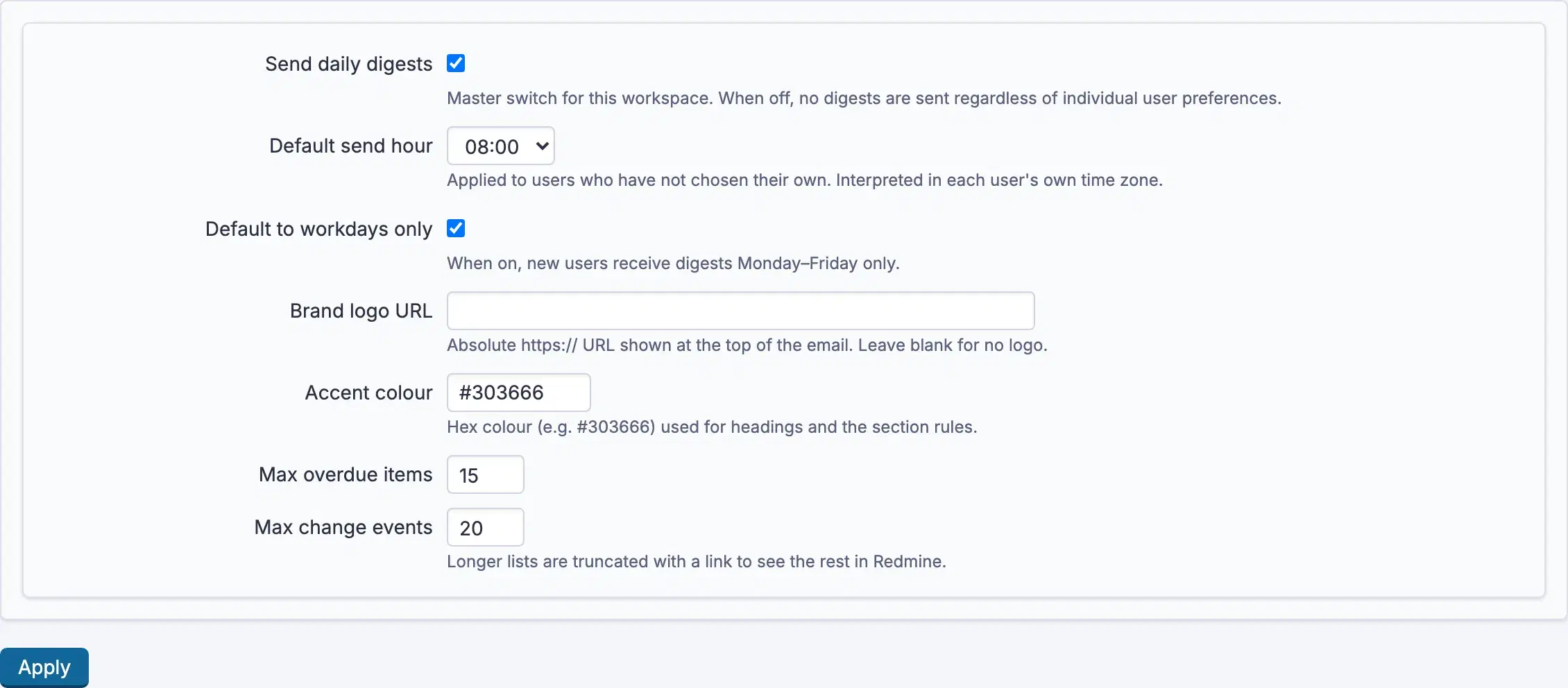
An administrator sets the defaults on the Daily Digest settings page in Redmine administration. There is nothing to set up per project.
| Setting | Default | Effect |
|---|---|---|
| Send daily digests | On | The master switch. Off means nothing is sent, whatever anyone has chosen. |
| Default send hour | 08:00 | Applied to people who have not picked their own hour. Read in each person's own time zone. |
| Default to workdays only | On | New accounts receive digests Monday to Friday only. |
| Max overdue items | 15 | Longer overdue lists are truncated, with a link to the rest. |
| Max change events | 20 | The same, for the changes section. |
| Accent colour | #303666 | The colour used for headings and section rules. Hex values only. |
| Brand logo URL | Blank | An https image shown at the top of the email. Blank means no logo. |
The master switch overrides every personal choice. The workdays default applies to new accounts. The two caps set how long the overdue and changes lists can grow. A longer list stops at the cap and ends with a line saying how many more there are, with a link to see the rest in Redmine. An accent colour that is not a hex value is rejected and the default is used.
Nobody has to sign up. A person who has never touched the settings receives the digest with the workspace defaults. Under Daily digest in their own account preferences, each person can switch it off, pick any hour of the day to receive it, and turn on the workdays-only setting, Monday to Friday, so weekends stay quiet.
Every digest also carries an unsubscribe link in its footer, and a standard List-Unsubscribe header. The link works without signing in. It turns the digest off and shows a confirmation with a one-click button to turn it back on. Each link is signed and expires after 30 days. A tampered or expired link changes nothing.
Unsubscribing keeps the rest of a person's choices. Turning the digest back on restores the same send hour and the same workdays setting they had before.
A digest contains work assigned to the person receiving it. There is no way to configure one person's digest to include another person's work.
Visibility is checked as the recipient, never as anyone else. Every issue in a digest comes through a single entry point that applies the recipient's own access, and tests render a digest for someone with narrower access to prove nothing leaks through. Private notes appear only for people allowed to see private notes.
Because a digest shows only what Redmine would already show that person, there is nothing to grant. It has no permissions of its own and no project module to enable. And a person with nothing outstanding is not emailed at all.
The digest keeps two tables of its own. One holds each person's preferences. The other is the send log, one row per person per day, which is what stops a digest going out twice. It adds no columns to Redmine's own tables.
On your own Redmine, uninstalling the plugin drops exactly those two tables.
Daily Digest is on every plan, from Startup. Every plan keeps full Redmine administrator access.
See what each plan includes, or look at the rest of what RedminePRO adds to Redmine.
Set-up and permissions: Daily Digest in the Knowledge Base. Install it on your own Redmine.
7-day trial on any plan. Full Redmine administrator access from the first day.