

Your status flow as a chart you can edit, sitting beside the checkbox matrix and editing exactly the same rules.
Your status flow as a visual, editable chart rather than the grid of checkboxes stock Redmine gives you. You can see which transitions exist, which roles may make them, and where a status has become a dead end. Because it edits the real Redmine workflow, nothing is simulated: what the chart shows is what the tracker enforces.
Redmine's workflow page is a grid. Down one side the status an issue is in, across the top the status it may move to, and a tick where the move is allowed. It is precise, and it is the thing the tracker actually reads.
Past about a dozen statuses it stops being readable. You cannot see that Feedback is a dead end by scanning a grid of ticks. You cannot see that nobody can reach On hold. The information is all there and the shape of it is not, because a grid shows you pairs and a workflow is a graph. The diagram answers those questions at a glance and lets you fix them in place.
This is the part that matters more than the drawing. The diagram is not a model of your workflow that someone has to keep in step with the real one. It is a view over Redmine's own rules, and edits go through the same method Redmine's workflow page calls rather than a reimplementation of it.
Three things follow. A change made on the matrix appears on the diagram, and the reverse, with no intermediate step. There is no second store to drift, no sync job to fail overnight and nothing to reconcile when the two disagree, because they cannot. And if the feature is ever removed, every rule stays exactly as it is.
There is a test that makes the same change through both pages and compares the resulting rows field by field. If that test ever fails, the designer is wrong and the matrix is right. That ordering is deliberate and it is the only safe one for a feature that edits permission rules.
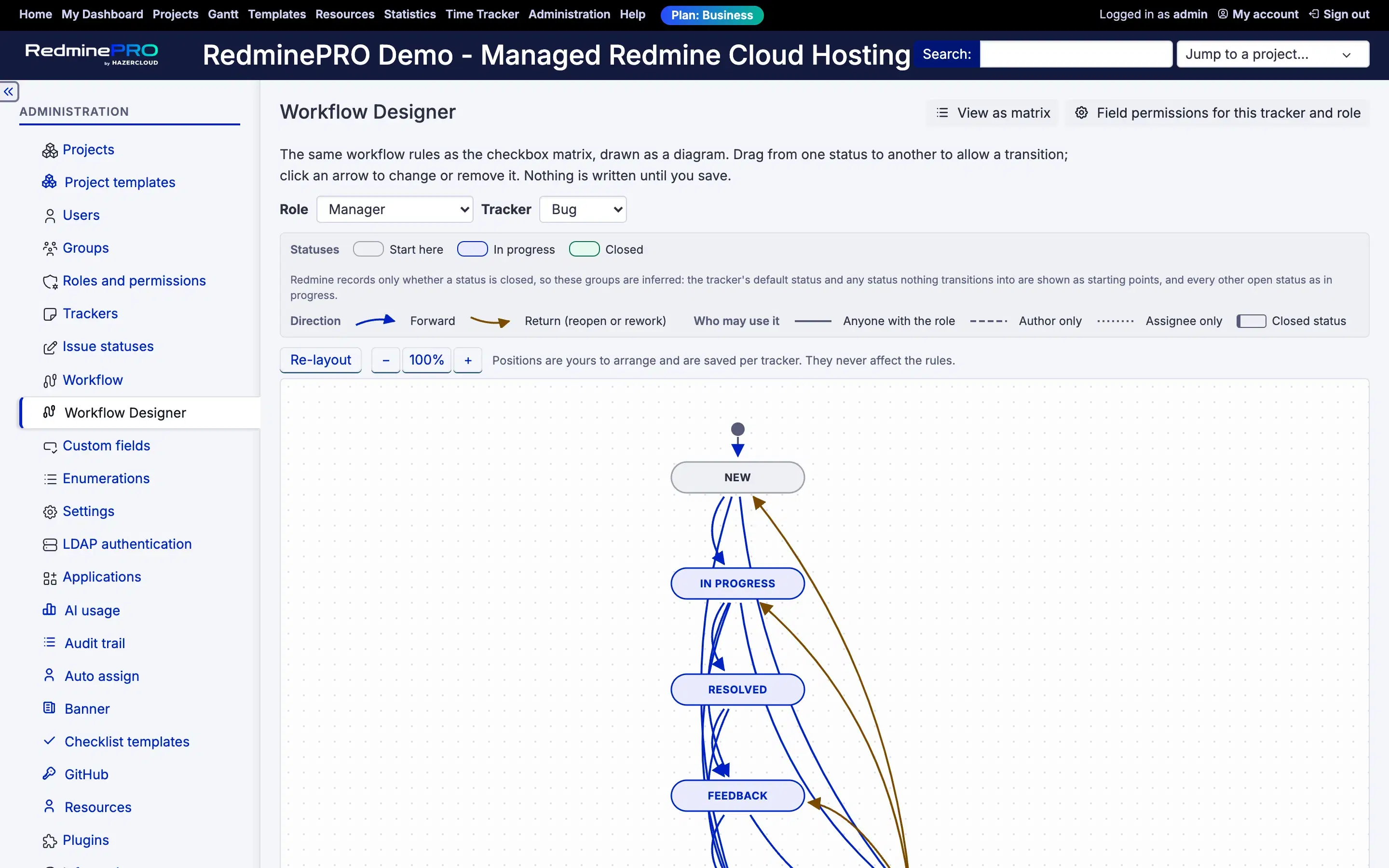
A box is a status. Closed statuses are drawn with a filled body and a heavier border, so the end of the flow is visible without reading a single label. An arrow is an allowed transition, drawn from the status you are in to the status you may move to.
The line style carries the permission. A solid line means anyone with the selected role may make that move. A dashed line means the issue's author only. A dotted line means the issue's assignee only. Where a transition allows more than one of those, the line shows the broadest and the extras are named on the arrow itself.
Colour is never the only difference between them. The line style and a printed legend carry the same information, because these are permission rules and an administrator who cannot distinguish two colours still has to read them correctly.
You look at one tracker and one role at a time, chosen with the same selectors as Redmine's own page. That selection lives in the URL, so a diagram is a link you can send to someone rather than a set of instructions for reproducing a view.
Statuses with no transitions at all are still drawn. Redmine's matrix hides unused statuses by default. The diagram shows them deliberately, because an unreachable status is very often the exact thing you opened the diagram to notice.
To add a transition, hover a box and drag from the small circle on its right edge to another box. A popover opens with Anyone with the role already ticked. To change or remove one, click the arrow: the popover shows which flavours it allows, and you tick and untick them. Unticking the last one removes the transition.
Dragging a box by its body moves the box. The circle on its edge is what draws a transition. One gesture never means two things, which is what makes a diagram safe to edit with a mouse.
Nothing is written until you save. Edits collect in a bar at the bottom of the page that lists every pending change by name, so you read + New to In Progress, anyone with the role rather than trying to remember what you just dragged. Save commits the whole set in one transaction. Discard throws it away. Leaving the page with changes staged prompts you first.
That review step exists because workflow rules decide who may do what. A feature that wrote each drag straight to the database would be faster and would be wrong.
The page records the state of the selected tracker and role at the moment it loaded. If another administrator changes that same workflow before you save, your save is refused and nothing is written. You are told to refresh and stage your changes again rather than silently overwriting work you never saw.
The same protection covers a status being deleted while your changes sit staged. The save is refused, it names which staged items are now stale, and no part of the set is written. A partial write of a permission model is worse than no write, so there is no path that produces one.
Drag the boxes into an arrangement that matches how your team actually thinks about the flow. Positions are saved per tracker and restored next time. Re-layout throws them away and returns to the automatic arrangement.
Those positions are stored separately from everything else and they are the only thing this feature owns. A missing, corrupt or outdated layout falls back to automatic placement. It cannot affect a rule and it cannot break the page.
Zoom uses buttons rather than the mouse wheel, so scrolling a long administration page does not zoom the diagram by accident. The drawing surface is the whole box rather than just the part with statuses on it, and it grows as you drag, so a status pulled out to one side is never clipped at an edge.
Field permissions, meaning read-only and required fields per status and role, stay on Redmine's own tab. The diagram links straight to it for the tracker and role you are looking at. Creating statuses stays in Redmine administration, and the diagram picks up a new one as soon as it exists. Copying a workflow between trackers stays on Redmine's copy page.
There is no export, and no per-issue mini-map. The feature is administration-only, which is the same authority Redmine's workflow page requires. There is no separate permission to grant and no project module to enable, because being allowed to edit the workflow as a diagram but not as a matrix is not a distinction worth holding.
The workflow designer is on the Business and Enterprise plans. Startup and Plus do not include it. Every RedminePRO plan keeps full Redmine administrator access, so the standard workflow matrix is there on all four whatever you are paying.
It was built for workflows that have outgrown the grid and tested at thirty statuses and two hundred transitions. See what each plan includes, or look at the rest of what RedminePRO adds to Redmine.
Set-up and permissions: Workflow Designer in the Knowledge Base. Install it on your own Redmine.
7-day trial on any plan. Full Redmine administrator access from the first day.