

When an issue reaches a status, hand it to the right person automatically. "A bug moves to testing, the QA lead picks it up", without anyone having to remember. Rules live per project, or in named sets you attach to many projects at once so one edit changes them everywhere.
A rule never overrules a person. If the same change that moved the status also set an assignee by hand, the manual choice stands.
On RedminePRO Cloud
Availability
Business and above.
Turn it on
Per project: Project → Settings → Modules → tick Auto Assign. An
Auto assign entry then appears in the project menu for whoever holds the
permission below.
Permissions
Administration → Roles and permissions, in the Auto Assign section:
| Permission | What it grants |
|---|---|
Manage auto-assign rules |
Create, edit and delete that project's rules, and attach a rule set to it |
Nobody needs a permission for rules to apply. They are part of how the project works, not something a person invokes.
Settings
None workspace-wide. Everything is configured per project, or in the shared rule
sets at Administration → Auto assign.
Using it
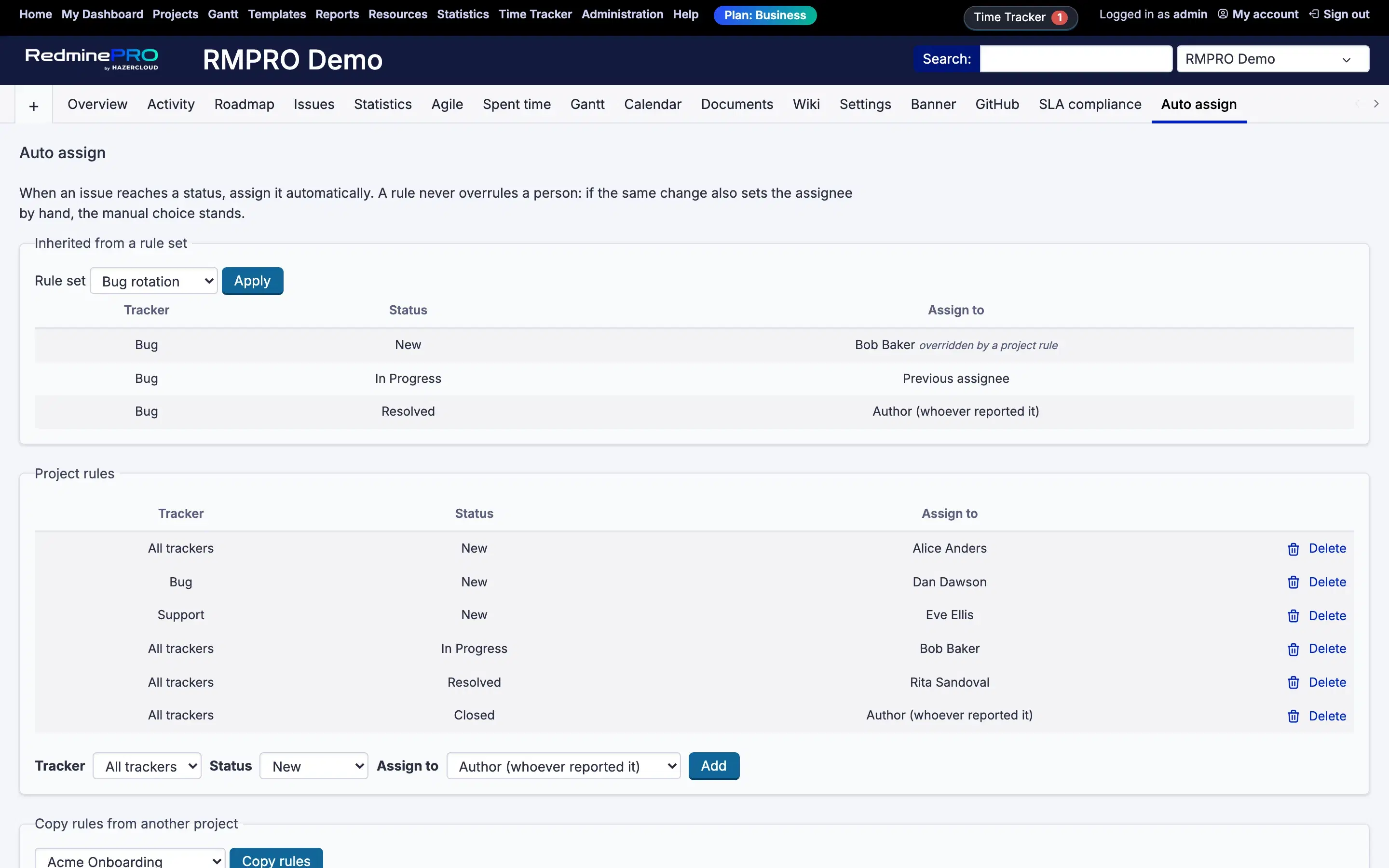
- Enable the module on the project and open
Auto assignin its menu. - Add a rule: pick a tracker (or
All trackers), the status that triggers it, andAssign to. Assign toaccepts a specific person or group, or one of the automatic choices,Author (whoever reported it),Previous assignee, orNobody (clear the assignee).- A rule naming a specific tracker beats a rule for
All trackerson the same status, so you can set a general rule and carve out exceptions. Copy rules from another projectbrings an existing set over as a starting point.
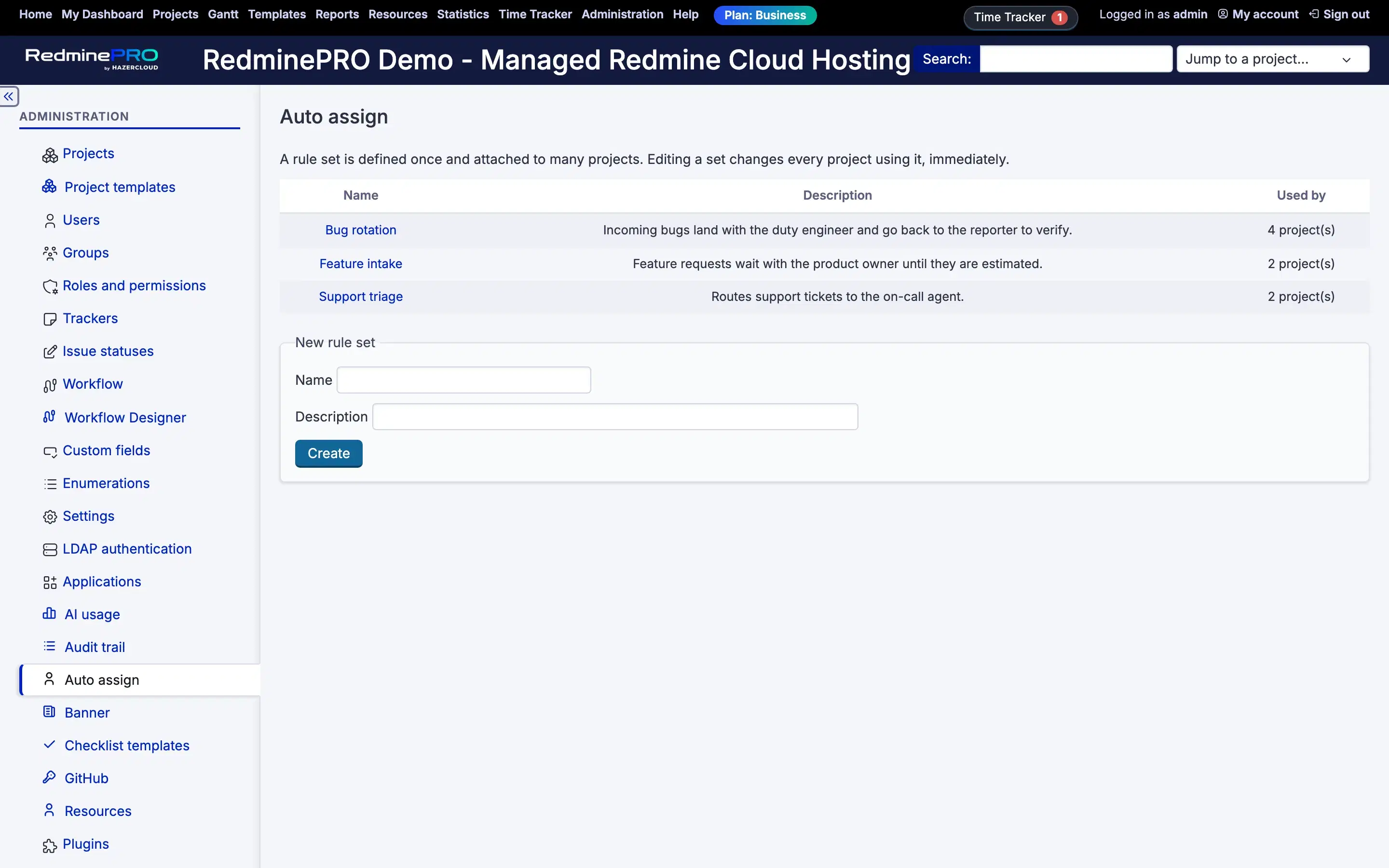
Rule sets are the way to run one policy across many projects.
Administration → Auto assign → New rule set. Attach a set to a project from
that project's rules page; its rules then show as Inherited from a rule set.
A project's own rule for the same tracker and status wins, and the inherited one
is shown as overridden by a project rule so you can see what is happening
rather than wonder.
Sets are referenced, not copied: editing a set changes every project using it,
and Used by tells you how many that is before you edit.
Rules apply wherever an issue is saved, the issue form, inline editing, a board drag, a bulk edit and the API, because the rule runs at the model, not in one page's code.
Troubleshooting
Nothing was assigned. Check the module is on for the project, that a rule matches this tracker and status, and that the same save did not also set the assignee by hand. A manual choice always wins.
The wrong rule fired. A rule naming the tracker beats one for
All trackers. Look for a more specific rule on the same status.
A project rule is being ignored. It is not. A project rule beats an
inherited one. The inherited row is marked overridden by a project rule.
A rule shows (deleted). Its target person, tracker or status no longer
exists. The rule stops matching rather than assigning to nothing; edit or delete
it.
Editing a set changed several projects. That is what a set is for. Sets are
referenced, not copied. Used by shows the count before you edit.