

Assign an issue automatically when it reaches a status, with rules per project or shared rule sets.
Documented for version 1.0.0 · Verified against 932d12e
When an issue reaches a status, hand it to the right person automatically. "A bug moves to testing, the QA lead picks it up", without anyone having to remember. Rules live per project, or in named sets you attach to many projects at once so one edit changes them everywhere.
A rule never overrules a person. If the same change that moved the status also set an assignee by hand, the manual choice stands.
Settings → Modules → tick Auto Assign. An Auto assign entry then appears in the project menu for whoever holds the permission below.Auto assign.Auto assign in its menu. Add a rule: pick a tracker (or All trackers), the status that triggers it, and Assign to.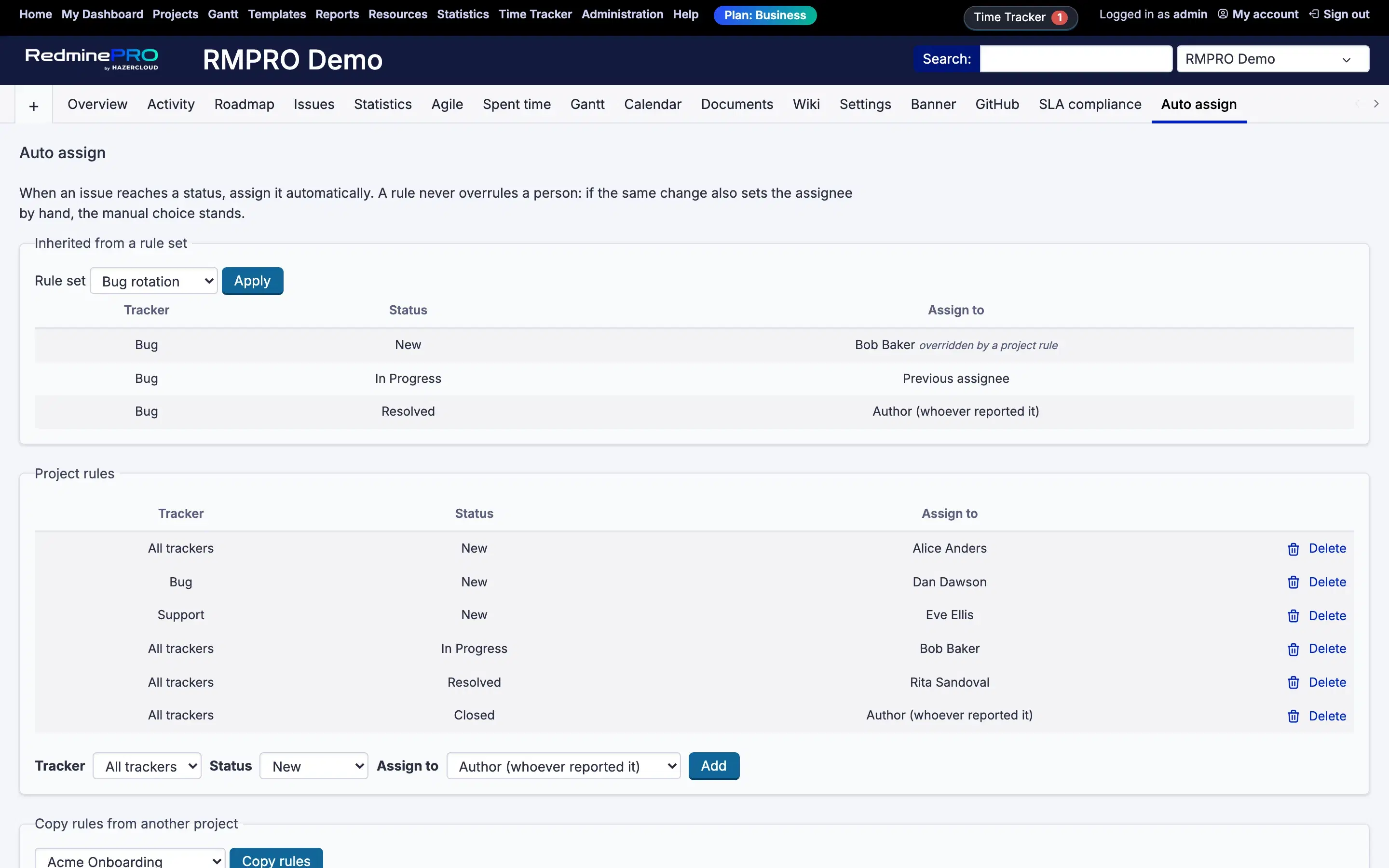
Settings, permissions, modules and how to use it on RedminePRO Cloud.
Requirements, install, update and remove, for a self-hosted Redmine 6.
Check the module is on for the project, that a rule matches this tracker and status, and that the same save did not also set the assignee by hand. A manual choice always wins.
A rule naming the tracker beats one for All trackers. Look for a more specific rule on the same status.
It is not. A project rule beats an inherited one. The inherited row is marked overridden by a project rule.