

On this page
Zaira answers questions about the work in front of her and drafts issues from
a sentence. She reads only what the person asking may already read. The context
she is given is assembled with that person's own permissions, so she cannot
summarise a ticket they could not open. You bring your own provider account, so
the model, the cost and the data-handling agreement are yours.
Choosing and connecting a provider is covered in AI providers.
On RedminePRO Cloud
Availability
Every plan. Your plan caps how long the record of AI use is kept.
Turn it on
Per project: Project → Settings → Modules → tick AI. A provider must be
configured first. See below.
Permissions
Administration → Roles and permissions, in the AI section:
| Permission | What it grants |
|---|---|
Use AI |
Ask questions and use the assistance in that project |
Create issues with AI |
Turn a description into drafted issues |
Neither widens what a person can see. Context is gathered as that person, so two people asking the same question about the same project can get different answers, correctly.
Settings
Administration → Plugins → RedminePRO AI:
| Setting | Default | Effect |
|---|---|---|
Default provider and model |
None | Which provider answers, and which model |
API key |
Blank | Stored encrypted. Leave blank to keep the stored one |
Monthly quotas |
Blank | A workspace total and a per-person share. Blank means unlimited; only successful calls count |
Allow private notes in AI context |
Off | Even when on, a private note is sent only if the person asking may read it |
Extra redaction patterns |
Blank | One expression per line. Email addresses and phone numbers are always removed |
Restore redacted values in output |
Off | Puts removed values back into the answer shown to the reader |
Keep audit rows for (months) |
Set | How long the record of AI use is kept. Your plan sets the ceiling |
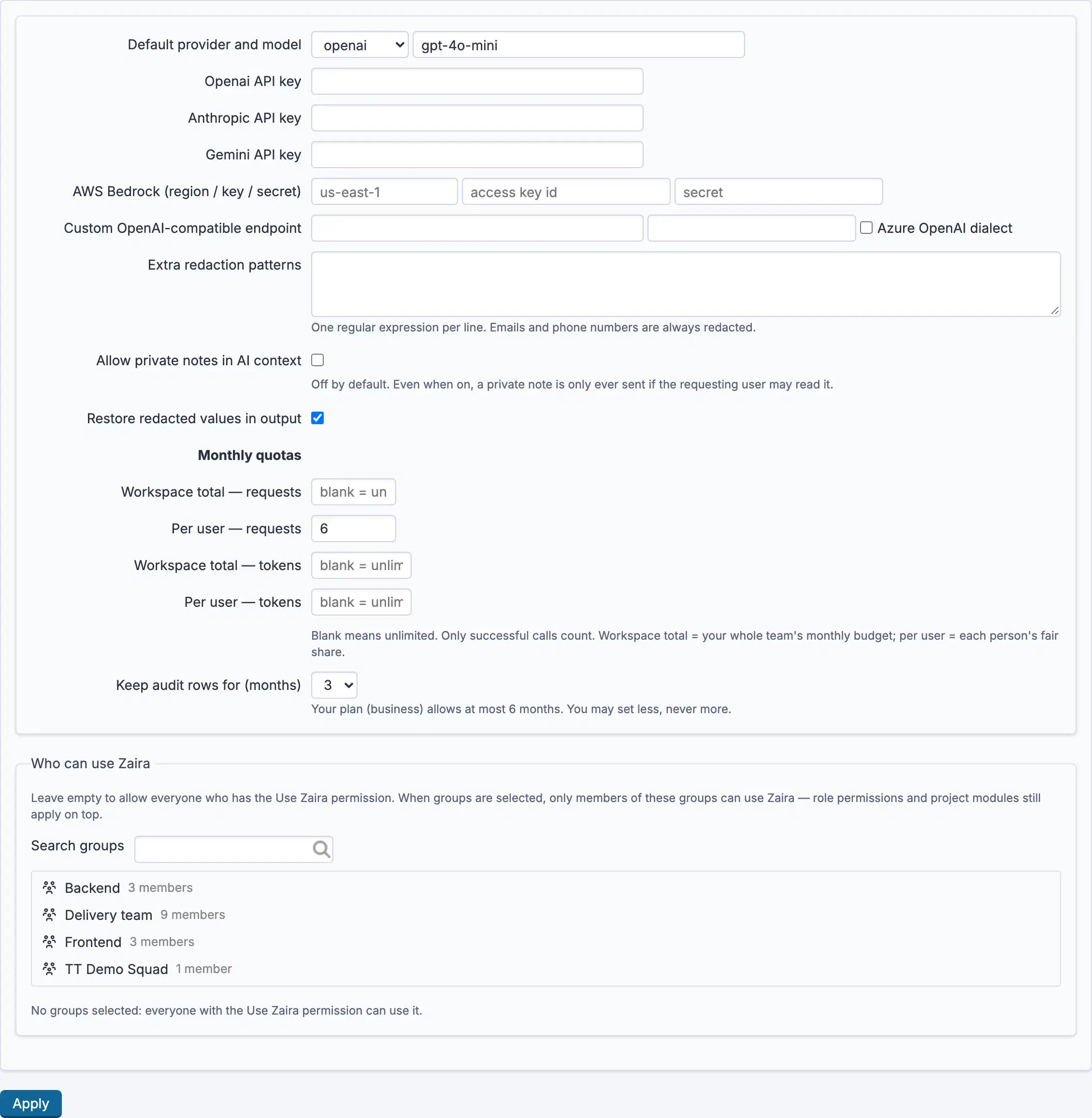
Redaction happens before anything leaves the workspace. Email addresses and phone numbers always go; add your own patterns for identifiers particular to your business, account numbers, case references.
Allow private notes in AI context deserves a deliberate decision. Off is the
default and the safe choice; on is still bounded by what the asker may read, but
it does mean private notes can reach your provider.
Set Monthly quotas before rolling out widely. A workspace total is your
team's whole budget; the per-person figure keeps one enthusiast from spending it
in a morning.
Using it
- Open
Ask Zairain a project where the module is on. - Ask in ordinary language. Answers are drawn from issues, comments and wiki pages you can already see.
- With
Create issues with AI, describe a piece of work and get numbered drafts, which you review and edit before anything is created. Nothing is created without you.
AI usage shows what has been spent against your quotas and who is using it.
Troubleshooting
No Ask Zaira in the project. The module is off there, or the account lacks
Use AI.
Every request fails. No provider is configured, the API key is wrong or
expired, or the workspace cannot reach the provider. The provider's own error is
reported rather than hidden.
A quota is exhausted. Monthly quotas is reached, for the workspace or for
that person. Only successful calls count, so a run of failures does not consume
it.
An answer misses something obvious. The asker cannot see it. Context is assembled with their permissions, and that is not configurable. Check their project membership rather than the AI settings.
Redacted markers appear in an answer. A value matched a redaction pattern
before the request left. Turn on Restore redacted values in output to put them
back for the reader, knowing the provider still never received them.
Private notes are being ignored. Allow private notes in AI context is off,
or the asker may not read them.
Connecting AI model providers
Zaira uses your provider account, not ours. You choose the provider and
the model, you hold the contract, and the data-handling terms that apply are the
ones you agreed with them. Five options are supported, and no others: OpenAI,
Anthropic, Google Gemini, AWS Bedrock, and any endpoint that speaks the OpenAI
dialect, which covers Azure OpenAI and most self-hosted gateways.
Using the feature is covered on the Zaira AI configuration page.
On RedminePRO Cloud
The feature is preinstalled. Start at the next section.
On your own Redmine
Install the feature first, see the Zaira AI configuration page, then follow the same steps. Your workspace needs outbound network access to whichever provider you pick.
Before you start
- An account with one of the supported providers, and the right to create credentials on it.
- A decision about which model. Cost and quality differ enormously between a provider's own models, and you are paying for it directly.
- A decision about private notes and redaction before anybody starts asking questions, not after.
On the external side
Do the equivalent of these on whichever provider you chose:
- Create an API credential scoped as narrowly as the provider allows.
- Set a spending limit on the provider's side. The workspace's own
Monthly quotaslimit calls, not currency, and only the provider knows what a call costs. - Note the model identifier you intend to use, exactly as the provider writes it.
- For AWS Bedrock, you need a region as well as a key and a secret, and the model must be enabled in that region for your account.
- For Azure OpenAI or another compatible gateway, note the full endpoint address as well as the credential. That is what the compatible-endpoint option asks for.
If your organisation has a data-processing agreement to sign with the provider, this is the moment. Questions asked here leave your workspace and reach them.
In RedminePRO
- Administration →
Plugins→ RedminePRO AI. - Set
Default provider and model. The five choices map to the providers above;Custom OpenAI-compatible endpointandAzure OpenAI dialectcover the gateway cases, andAWS Bedrock (region / key / secret)takes the three Bedrock values. - Paste the
API key. It is stored encrypted and never displayed again. - Set
Monthly quotas, a workspace total and a per-person share. Blank means unlimited, which is rarely what you want on a paid account. - Decide on
Allow private notes in AI context. Off is the default. Even when on, a private note is only ever sent if the person asking may read it. - Add
Extra redaction patternsfor identifiers particular to your business. Email addresses and phone numbers are always removed regardless. - Enable the module on a project and grant
Use AI.
Verify it works
Open a project with the module enabled and ask Zaira something you can check.
"summarise the most recently updated issue" is a good first question, because
you can open the issue and compare.
Then check AI usage: one successful call should be recorded against your
quota. If the answer came back but usage shows nothing, you are looking at a
different provider configuration than you think.
Finally, ask as somebody with narrower access and confirm they get a narrower answer. That is the containment property worth seeing once with your own eyes.
What is stored
In the workspace: the provider choice, the model, and the credential encrypted
at rest and never logged. A usage record per call, who, when, which provider,
whether it succeeded, kept for as long as Keep audit rows for (months)
allows.
Sent to the provider: the question, and the context assembled for it from issues, comments and wiki pages the asker may already read. Email addresses and phone numbers are removed before it leaves, along with anything matching your own patterns. Private notes are excluded unless you turned them on.
Never sent: anything the asker could not read, passwords, or the workspace's own credentials.
What the provider does with what it receives is governed by your agreement with them, which is the reason the account is yours rather than ours.
Troubleshooting
| What you see | Why | What to do |
|---|---|---|
| Every request fails immediately | No provider configured, or a wrong or expired API key |
The provider's own error is shown rather than hidden. Read it |
| Requests fail only sometimes | The provider is rate-limiting you | Their limit, not the workspace's. Check your account's tier |
| A quota is exhausted | Monthly quotas reached for the workspace or the person |
Only successful calls count, so a run of failures did not cause it |
| Bedrock refuses the model | The model is not enabled in that region for your account | Enable it in the provider's console, or pick another region |
| A compatible endpoint returns not-found | The endpoint address is missing a path segment the gateway expects | Paste the full address the gateway documents |
| Redacted markers in the answer | A value matched a redaction pattern before the request left | Turn on Restore redacted values in output; the provider still never saw it |