

On this page
Every new client onboarding, every new release, every new audit, the same
shape, rebuilt by hand each time. A template captures that shape once: the
Structure, the Starter issues with dates relative to a start day you choose,
the Members, and the project's Auto Assign, Checklists, Agile and Banner
settings. New projects start from the gallery instead of from an empty form.
A template is a stored definition, not a live project. Everything in it is
recorded by name, so it keeps working after the project it came from is
renamed, archived or deleted. It also carries less than Redmine's Copy does.
See What a template does not carry below.
On RedminePRO Cloud
Availability
Business and above.
Turn it on
Nothing per project. Grant the permissions below, and the gallery appears when someone creates a project.
Permissions
Administration → Roles and permissions, in the Project Templates section:
| Permission | What it grants |
|---|---|
Create projects from templates |
Start a new project from the gallery |
Manage project templates |
Create, edit and delete templates, and save a project as one |
Creating a project still needs Redmine's own right to create one,
Create project, or Create subprojects for a subproject. This grants the use
of a template, never the ability to make projects. With Create subprojects alone,
the gallery offers only the projects you may add subprojects to.
Manage project templates held in any role, in any project, manages every
template, because templates belong to the workspace rather than to a project.
It does not let anyone create projects, and it does not let anyone read a
project they could not already see.
What a template holds is another matter. Everyone who holds
Manage project templates can open every template and read what it captured,
a starter issue's description included, and it arrives in every project made
from it, whatever the privacy of the project it was saved from. Only save as a
template what all of them may read.
Templates add no authority
A template can name anyone, with any role. Whether they are added is decided
when the project is created, by what the person creating it could do on the new
project's Members tab. An administrator, or someone whose role in new projects
has Manage members for all roles, gets everyone the template names. Someone
whose role manages only some roles gets each person or group whose roles are
all among them, and not the others, never a part of what the template names.
Someone whose role cannot manage members gets nobody: no named members, no
groups, no placeholder picks. The form says so before Create, the summary
names each person left out, and their issues are created unassigned. Roles you
inherit from the parent project count, as they would on the Members tab, and
someone refused who is in the project anyway, through a group you may add, or
inherited from the parent, is told what they were not given instead.
To let the people who create projects bring a template's members with them, go
to Administration → Settings → Projects and set
Role given to a non-admin user who creates a project to a role with
Manage members for all roles, or for the roles your templates name.
Settings
None workspace-wide. Templates are kept under Templates in the top menu,
which opens the template list for anyone holding Manage project templates and
the gallery for everyone else who may use it. Administrators also find the list
at Administration → Project templates.
Using it
- Create a project with
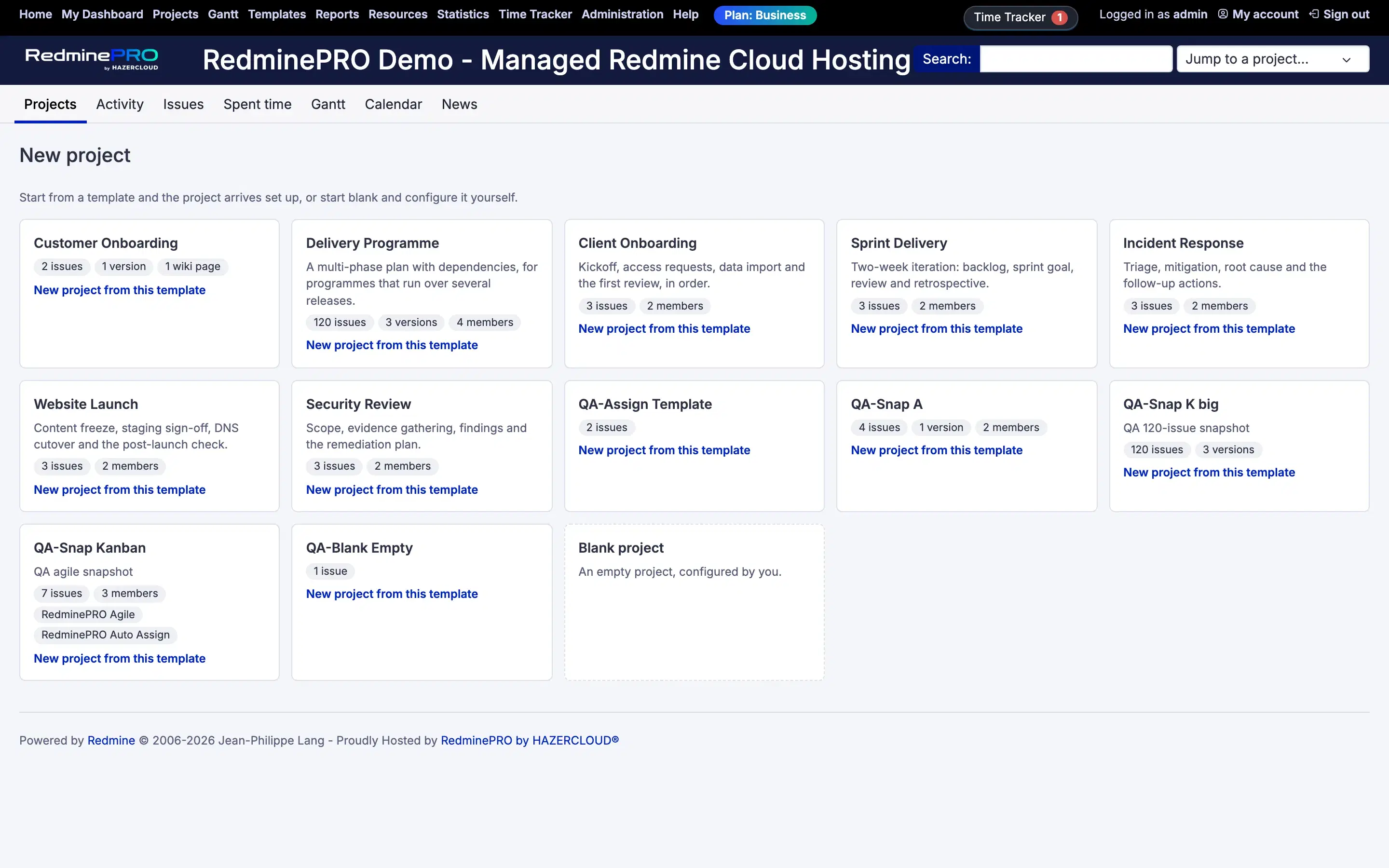
New project. When there is a template you can use, the gallery opens: one card per template, showing what it sets up, its starter issues, versions, wiki pages, members and the features it configures, and aBlank projectcard for Redmine's own form. Every template is offered to everyone who may use the gallery. - Choose
New project from this template. The form starts from the template: its name and description,Public,Inherit membersand the project's custom fields are filled in from it,Subproject offrom where you started, and everything you change wins. If your role in new projects may not choose whether a project is public, thePublicbox cannot be changed: you get the workspace's default, or a private project when the template is private. - Pick the day in
Project starts on. Day zero is that date, soStart (day)andDue (day)on each starter issue land relative to it. Left blank, it is today. A past date is allowed, and the summary points it out; a date more than 100 years away is refused as a mistyped year. - Under
Who fills these roles?, choose a person for each role placeholder. A template says "Project Manager" rather than naming someone, and you decide who that is. Whoever you pick becomes a member of the new project, and the issues for that role are theirs. If you may add members to it (see Templates add no authority). A placeholder markedRequiredmust be filled, and so must one that is the assignee of starter issues your role's workflow will not accept without an assignee; it is marked as required too. - Above
Create, a warning lists any starter issues your role's workflow would refuse as the form stands: a field the workflow requires on a new issue, such as an assignee, a version or a category, that the issue would arrive without, why, and which issues. It is worked out for the roles you will hold in the new project, your roles in the parent whenInherit membersis ticked, and what the template gives you where you may give it, and for whom you may add there: someone the template names whom you may not add cannot be assigned, and the line says why. It changes as you change the parent,Inherit membersor a pick. Choose people where it says so; an issue still missing a field is skipped when the project is created, and the rest of the template is created either way. Create. The project, its structure, wiki and members are made together, and the starter issues straight after, in the same request; nobody is emailed about what the template adds. Past about 200 starter issues that request is slow, as the editor warns. You land on the project's settings, or its overview, if your role cannot open the settings, with a summary of what was made and of anything that could not be made as the template has it.
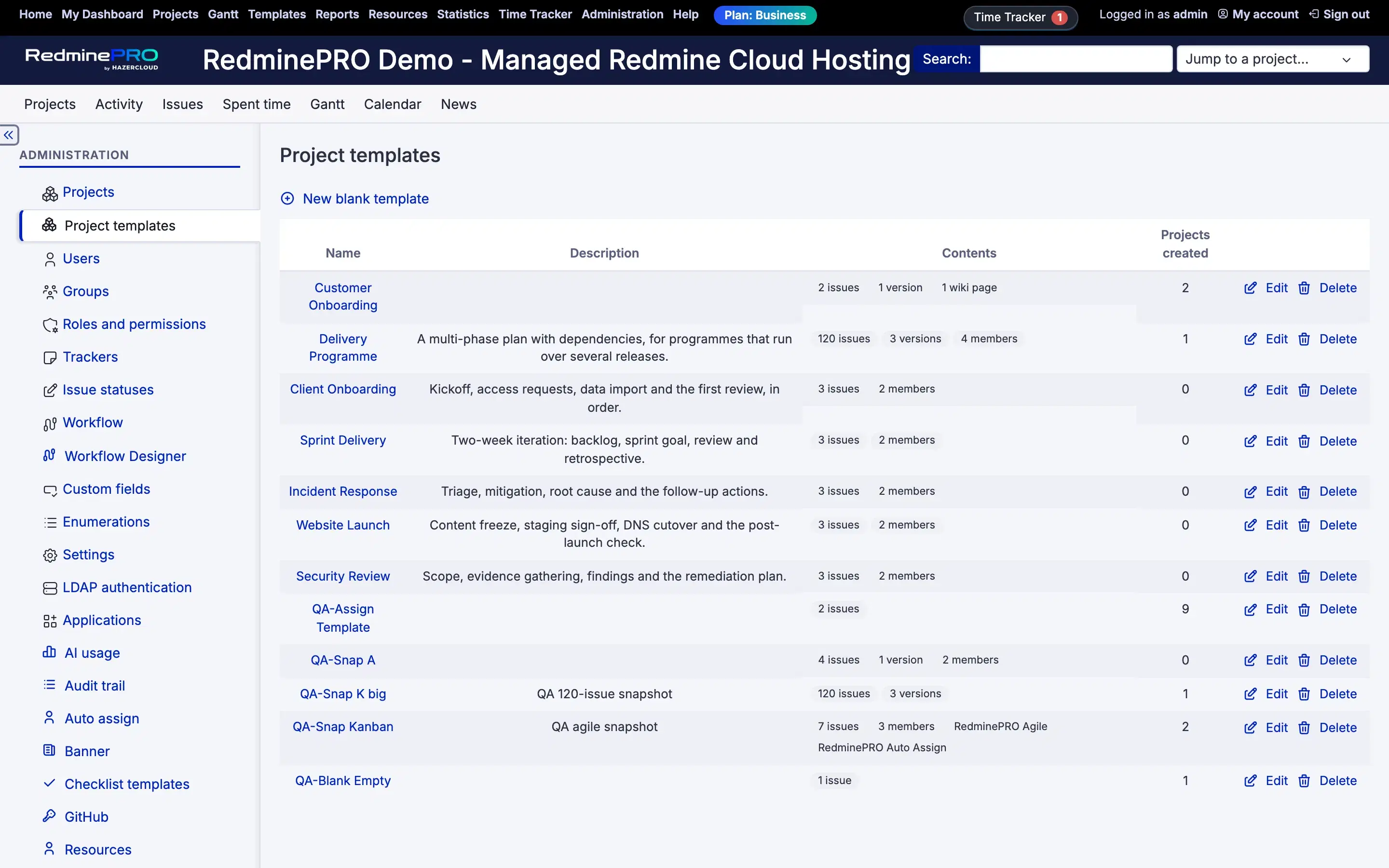
Making a template. Either New blank template under Templates, or open a
project and choose Save as template from its actions menu. Saving captures
what you can see of the project: its modules, trackers, versions, categories,
wiki pages, open issues, members, and its Auto Assign, Checklists, Agile and
Banner settings where your role there may read them, listed under
Plugin settings carried. No other feature's settings come with it. Issues,
wiki pages and fields that are hidden from you are not captured. Members are
taken as the project holds them, locked accounts included, though a project
made from the template does not add those. When an administrator saves, wiki
pages and issues under a switched-off module are captured too, and projects
made from the template get that module switched on.
A banner's content, style, pages and whether it can be dismissed travel with the template; its schedule does not, and it starts switched on only if it was showing when the template was saved.
Editing a template. Choose it under Templates. One form holds its
Structure, its Role placeholders, each with the Roles the person picked
should hold, its Starter issues, with More fields for description, status,
category, version, estimate, % done, privacy and custom fields, its Members,
and which feature settings it carries. A save changes only what you changed. A
row shown in amber says what creation would skip or change, and why. The
template list shows each template's Contents and how many Projects created
it has produced.
Under More fields, each starter issue has an input for every custom field its
tracker uses. Typed values are checked as Redmine checks them on an issue. Chosen
values are chosen by name: a list's entries, a version from the template's own
or one shared with every project, and a person from the people the template's
Members name, since a project made from it can only hold its members in such a
field, and only those you may add as a member when you create it. A value the lists no longer offer stays chosen, marked as such, until you
change it. A value you clear arrives empty on new issues, or, for a required
field with a default, with that default, since an empty one would cost the
issue. Values no input shows, for a field the issue's tracker does not use, or
one that was deleted, are listed under Kept as they are and saved unchanged.
A field Redmine shows only to some roles can be edited here by an administrator
only; other template managers do not see it, and their saves leave it as it is.
In a template made before 1.2.0, person, version and key/value fields are listed
rather than edited until the template is re-snapshotted.
If someone else saved the template after you opened it, your save is refused
with Data has been updated by another user. and the editor opens again with
their version, so nothing they saved is overwritten.
The editor's Re-snapshot button replaces the template's contents with its source project as it stands, as you see it. It is offered while that project exists, is not archived, and you can see it, and it is refused when some of the project's issues, wiki pages, versions, categories or custom-field values are hidden from you. Hand edits and placeholders are replaced. Kept as they were: the count of projects made from the template, the settings of features that are not installed, and the settings your role in that project may not read.
When something has changed since. A template outlives what it names, and creation never fails because of that: it applies everything it can and the summary says what it could not.
- A starter issue on a tracker that was deleted, or that the template does not enable, is skipped.
- Someone who cannot be assigned issues in the new project, a locked account, someone who is not a member with a role that can take issues, or a group where issues cannot be assigned to groups, leaves the issue unassigned. Locked accounts are not added as members.
- A status that was deleted, closed, or is not in the tracker's workflow falls back to the tracker's default, and a missing priority to the default one; a missing version or category is left off the issue.
- Values you may not set, a custom field your role in the new project cannot edit, or a version sharing you may not choose, get Redmine's default instead, and the summary says which.
- Redmine's own rules still apply: a field that your role's workflow, or a
required custom field, needs and the issue arrives without costs that issue,
and the summary names the field. That includes an assignee, version or
category left off for the reasons above, where your role's workflow requires
it on a new issue. The form lists such issues above
Createfirst, so you know before the project exists.
What a template does not carry
Compared with Redmine's Copy, a template leaves out:
- closed issues. Only open ones are captured;
- attachments, on issues, versions and wiki pages, and the project's
Files; Watchers;- relations to issues it does not carry, such as closed ones or ones in another project;
- the project's
HomepageandDefault issue query; - saved
Custom queries, for issues and spent time; ForumsandDocuments;- members whose account is locked;
- anything the person who saved it could not see.
Every starter issue and every wiki page is authored by the person who creates
the project; a copy keeps each wiki page's author. Neither a template nor a copy
brings the project's Default assignee, or any history: issue notes, spent time
or news.
Troubleshooting
No gallery when creating a project. Either the account lacks
Create projects from templates, or it holds neither Create project nor
Create subprojects, or there is no template that can be used yet. A link that
fills in the new-project form in advance also opens that form directly.
A template is not offered. There is no per-template restriction: every
template is offered to everyone who may use the gallery. A template that cannot
be used is still shown, as a card that says why,
Cannot be used: its definition cannot be read. or
Cannot be used: it was written by a newer version of the plugin., and whoever
manages templates can delete it from the template list.
Some starter issues are missing. Only open issues are ever captured, and
only those visible to whoever saved the template. Of the rest, an issue is
skipped when its tracker was deleted or is not enabled in the template, or when
Redmine refuses it, most often because your role's workflow, or a required
custom field, needs a value the template does not give. The summary names each
one and the reason, as far as it has room (see below). A missing status never
costs an issue; a missing person, version or category costs one only where your
role's workflow requires that field on a new issue. The form lists the issues
your role's workflow would refuse above Create, before anything is made.
A role placeholder is required though the template does not mark it. Your role's workflow requires an assignee on a new issue, and that placeholder is the assignee of starter issues: left empty, every one of them would be refused. Choose someone for it. If nobody should, whoever manages templates can change those issues' assignee in the template.
Some starter issues are unassigned. The template named someone who cannot be
assigned issues in the new project, a locked account, someone who is not a
member, someone none of whose roles there can take these issues, or a group
where issues cannot be assigned to groups, so the issue was created without an
assignee, and the summary says so. To a creator who is not an administrator, a
locked account reads as a login that was not found, and someone hidden from
them is named by login. A role placeholder left empty also leaves its issues
unassigned. Where your role's workflow requires an assignee on a new issue,
such an issue is skipped instead, and the form says so above Create.
People the template names are not in the project. Your role in new projects
cannot add them: it lacks Manage members, or manages only some roles and the
template gives them another. The summary names each one. See Templates add no
authority.
The summary does not list every warning. It lists as many as fit, then says how many more there are. An administrator can read them all in the workspace's log.
The dates are wrong. They are relative to the start date chosen at creation,
not absolute. Start (day) and Due (day) count from day zero. Redmine also
dates a parent issue from its subtasks, and starts an issue after the one it
follows; when that moves a date, the summary says so. A template saved from a
project with no dated issues keeps its version dates as they were.
A placeholder had nobody to choose. The people offered are the active users
you can see, which your roles' Users visibility decides: with
Members of visible projects you see the members of every project you can see,
public ones included, and if any of your roles has All active users, you see
everyone. Whoever you pick is added to the new project for you. When you can see
more than 200 people, the picker is a search, type part of a name. An optional
placeholder can also be left empty.
A save in the editor was refused. Data has been updated by another user.
means someone saved or re-snapshotted the template after you opened it. The
editor shows their version; make your change again.
Re-snapshot is missing or refused. It is offered only while the source project exists, is not archived and you can see it, and it is refused when some of that project's issues, wiki pages, versions, categories or custom-field values are hidden from you, because a snapshot taken by you would drop them. Someone who can see all of it can re-snapshot it.
Changing a template altered an existing project. It cannot. A template is a definition used at creation; projects made from it are independent afterwards.