

On this page
Support email becomes tickets. The people writing in do not need accounts, a
contact record holds who they are, and their replies land on the same ticket
rather than opening a new one. Response times are tracked against a service
level, SLA compliance reports how you are doing, and a portal lets customers
follow their own tickets without signing in to anything. Agents work on
ordinary Redmine issues throughout.
Connecting the mailbox is covered in helpdesk email.
Mailboxes, reply templates and service-level targets are configured from the console, not from a settings screen, on RedminePRO Cloud, support does it for you. There is no separate reply composer either: an agent replies by adding a note to the ticket, and it goes out as email.
On RedminePRO Cloud
Availability
Business and above.
Turn it on
Per project: Project → Settings → Modules → tick Helpdesk. Then ask
support to connect the mailbox for that project.
Permissions
Administration → Roles and permissions, in the Helpdesk section:
| Permission | What it grants |
|---|---|
View SLA report |
Open SLA compliance for the project |
One permission, because one helpdesk screen exists. Everything else a ticket needs is covered by Redmine's own issue permissions. A ticket is an ordinary issue, so seeing it, commenting on it and closing it are rights the project already grants, and an agent needs nothing extra to work one.
Grant View SLA report to whoever watches response times.
Settings
Administration → Plugins → RedminePRO Helpdesk:
| Setting | Default | Effect |
|---|---|---|
Poll helpdesk mailboxes |
On | The master switch for inbound mail. Off means no mailbox is polled anywhere |
Max messages per poll |
50 | A safety valve so a flooded mailbox cannot create unbounded work in one pass |
Auto-acknowledgements per contact per hour |
1 | Loop protection. The helpdesk can never mail-bomb one contact |
Attach the original .eml to new tickets |
Off | Useful when diagnosing encoding or threading problems |
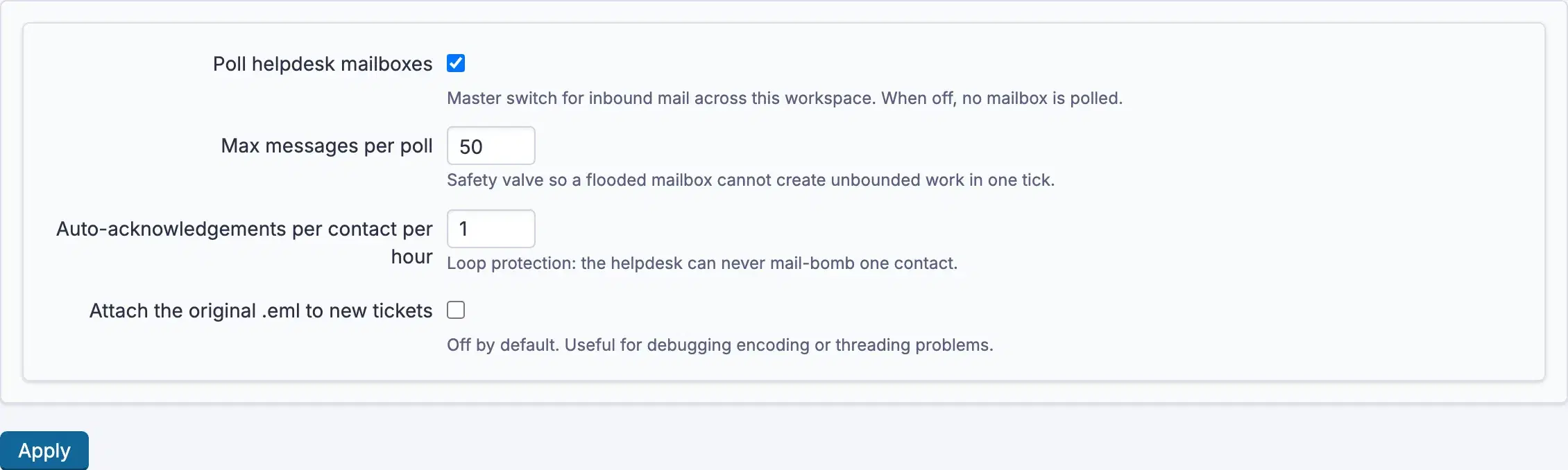
The two caps exist for the same reason: a system that answers email automatically can, in the wrong circumstances, answer itself. Leave them set.
These four are the whole settings screen. A mailbox, its address, host, port, sign-in name, encrypted password and folder, belongs to a project and is created from the console, and so are reply templates and service-level targets. See helpdesk email for what to gather.
Using it
- A customer emails the mailbox. A ticket is created and a contact record is attached, no Redmine account required, and they receive an acknowledgement.
- Agents work the ticket as an ordinary issue. Three columns are added to the
issue list,
First response due,Resolution dueandSLA status, so you can sort and group a queue by what is closest to breaching. - Replying is a note on the issue; it reaches the customer as email. Their reply comes back onto the same ticket.
- Closing the ticket emails the customer a satisfaction rating request, and their answer is recorded against it.
SLA compliance reports performance across tickets for anyone holding
View SLA report. A ticket's state reads On track, Due soon, Breached or
Met.
The portal lets a customer see Your tickets without an account: they enter
their address, receive a link by email, and see only their own. Sign-in is the
email itself, so there is no password to manage or leak.
Troubleshooting
No tickets are being created. Check Poll helpdesk mailboxes is on, that
the polling task is actually running on a schedule, that the project has a
mailbox configured, and that its credentials still work.
A reply came back as a new ticket. The customer's mail client stripped the
threading information. Turn on Attach the original .eml to new tickets while
investigating. It keeps the raw message for exactly this.
A customer received several acknowledgements. They should not.
Auto-acknowledgements per contact per hour caps it. If they did, check whether
two mailboxes are polling the same address.
A flood of mail arrived and only some became tickets. Max messages per poll limits one pass. The rest arrive on the next one; nothing is lost.
A service-level state looks wrong. Targets are configured per project from the console. Ask whoever set the mailbox up.
A customer cannot reach the portal. The link is emailed to the address they entered and works for that address only. Ask them to request a new link rather than forwarding an old one.
Connecting IMAP mail provider
The helpdesk reads a mailbox you own and turns what arrives into tickets. That mailbox lives with your mail provider, Google Workspace, Microsoft 365, or anything else speaking IMAP, and connecting it is work on their side as much as here.
Using the feature is covered on the Helpdesk configuration page.
In this version the mailbox is configured on the server, not through the interface. The steps below describe what to gather and who does it. On RedminePRO Cloud, support does it for you.
On RedminePRO Cloud
The feature is preinstalled. Gather the values below and ask support to connect the mailbox to your project.
On your own Redmine
Install the feature first, see the Helpdesk configuration page, then gather the same values and configure the mailbox on the server.
Before you start
- A dedicated support address. Use a mailbox that exists only for this. The helpdesk marks mail as it processes it, and pointing it at somebody's personal mailbox means their mail is processed too.
- Rights on your mail provider to create the mailbox and its credential.
- The project the tickets should land in, with the
Helpdeskmodule enabled. - Working outbound mail on the workspace, since replies and acknowledgements go out through it.
On the external side
- Create the support mailbox with your provider.
- Enable IMAP access on it. Both Google Workspace and Microsoft 365 have this as an explicit setting, and both default it off for new tenants in some configurations.
- Create a credential the helpdesk can use. Where the provider supports app-specific passwords, use one rather than the account's own password. It can be revoked on its own without disturbing anything else.
- Note these values:
- the address itself
- the IMAP host and port, and whether it requires TLS (port 993 with TLS is the normal answer)
- the sign-in name, which is not always the same as the address
- the folder to read, normally the inbox
- Decide what should happen to a message once it has been turned into a ticket. Marking it read is the default, and moving it to another folder is the alternative.
- Send one test message to the address and leave it unread.
In RedminePRO
An administrator records the values from step 4 against the project, along with the polling interval and the post-processing action, and marks the mailbox active. The credential is stored encrypted and is never displayed again or written to a log.
Then set the polling task to run on a schedule, because polling is driven by a task rather than by a background service:
*/5 * * * * cd /path/to/redmine && RAILS_ENV=production \
            bundle exec rake redminepro:helpdesk:poll
Check that Poll helpdesk mailboxes is on in Administration → Plugins →
RedminePRO Helpdesk. It is the master switch, and off means no mailbox anywhere
is read.
Verify it works
The test message from step 6 should become an issue in the project within one polling interval, with a contact attached, and the sender should receive one acknowledgement.
Then reply to that ticket from the workspace and confirm the mail arrives. Finally, reply to that from the customer's mail client and confirm it lands on the same ticket rather than opening a second one. Threading is the part most worth testing before you publish the address.
What is stored
The mailbox address, host, port, sign-in name and folder, and the credential encrypted at rest. Per message, an identifier so the same mail is never turned into two tickets. Contact records for the people who write in, their address and name, which exist so a customer needs no Redmine account.
The message itself becomes an ordinary issue with the conversation in its
history. The raw original is kept only when
Attach the original .eml to new tickets is on, which is a diagnostic setting
rather than a default.
Troubleshooting
| What you see | Why | What to do |
|---|---|---|
| No tickets at all | Polling is off, the task is not scheduled, or the credential fails | Check Poll helpdesk mailboxes, then that the task actually runs |
| It worked, then stopped | The credential expired or was revoked, often after a password change | Issue a new app-specific credential |
| A reply opened a second ticket | The customer's mail client stripped the threading information | Turn on Attach the original .eml to new tickets and inspect the raw message |
| A burst of mail arrived, some is missing | Max messages per poll limits one pass |
The rest arrive next pass; nothing is lost |
| A customer got several acknowledgements | Two mailboxes are polling the same address | Point one of them elsewhere |
| Mail is read but no ticket appears | The module is off for the project the mailbox points at | Project → Settings → Modules → Helpdesk |
| Somebody's personal mail became tickets | The mailbox is shared rather than dedicated | Use a mailbox that exists only for the helpdesk |